Track my notes
Quick answer
- On the Wellbeing landing page, click Track my notes (top right).
- Switch between the Open tasks, Active notes, and Closed/resolved notes tabs.
- Each tab label shows a live count, so you see your workload before clicking in.
Track wellbeing notes is your personal workspace for the open tasks assigned to you and the wellbeing notes you own, split across three tabs.
Open your tracking workspace
On the Wellbeing landing page, click Track my notes at the top right.

Check your open tasks
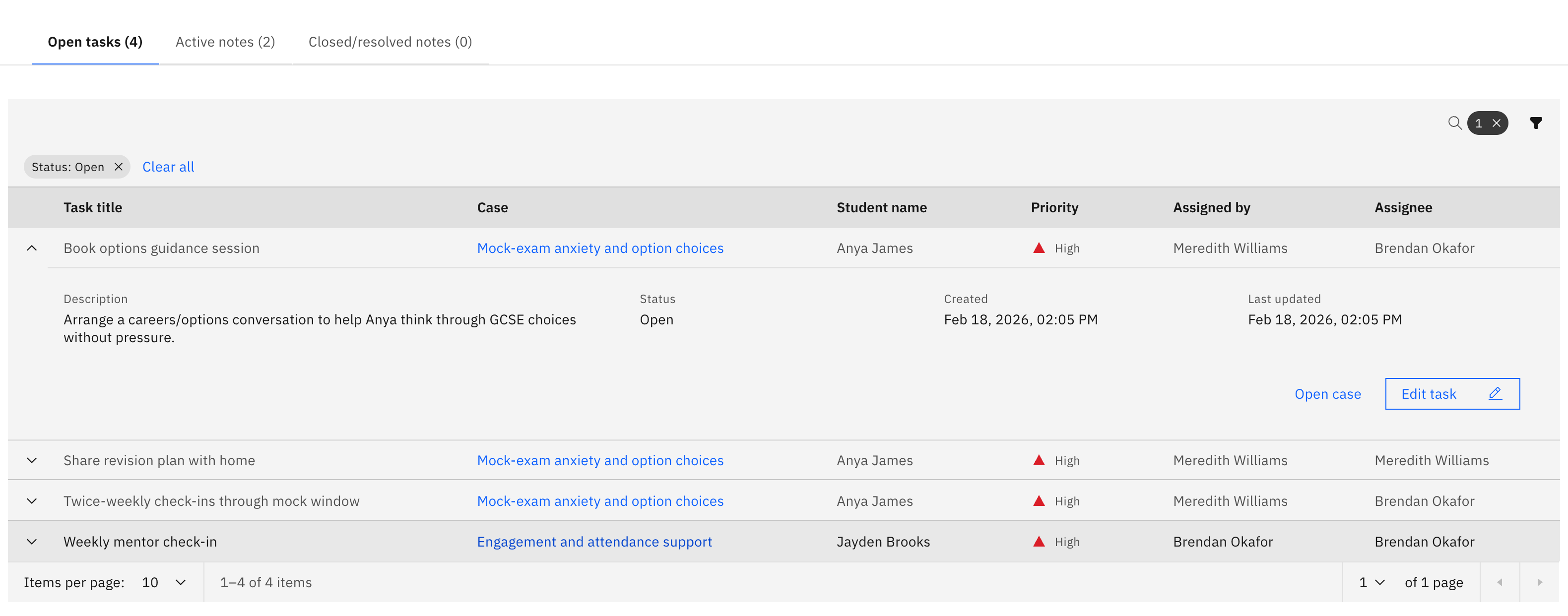
On the Open tasks tab, see the tasks assigned to you across every case — Task title, Case, Student, Priority. This tab defaults to showing Open tasks; clear or change the status filter to see completed and cancelled ones. Search, filter by status and priority, and click a row to expand it for the description, status, created/updated dates, and Open case / Edit task buttons.
Review your active notes
On the Active notes tab, see the wellbeing notes you currently own, in the same table layout as the landing page.
Look back at closed notes
The Closed/resolved notes tab lists your resolved and cancelled notes.
Open a case
Click a Case link (in tasks) or a Case title (in notes) to open that case's detail page. The count in each tab label reflects what that tab will load, so you can size up your workload before opening it.