Correct an already-submitted mark
Quick answer
- Once you submit a roll it locks, so you can't edit a mark directly.
- Ask Felix to correct an attendance mark to open a pre-filled correction form.
- Set the corrected mark and a reason, then submit.
- An attendance officer reviews and resolves it from their Correction request tab.
Once you submit a roll it's locked, so you can't change a mark directly on it. To fix a mistake, you log a correction request through Felix, which an attendance officer then reviews and resolves.
Ask Felix to correct the mark
Open Felix and ask for the correction, for example "I need to correct an attendance mark" or "fix the roll". Felix confirms that submitted rolls are read-only and opens a correction form pre-filled for a recent session.
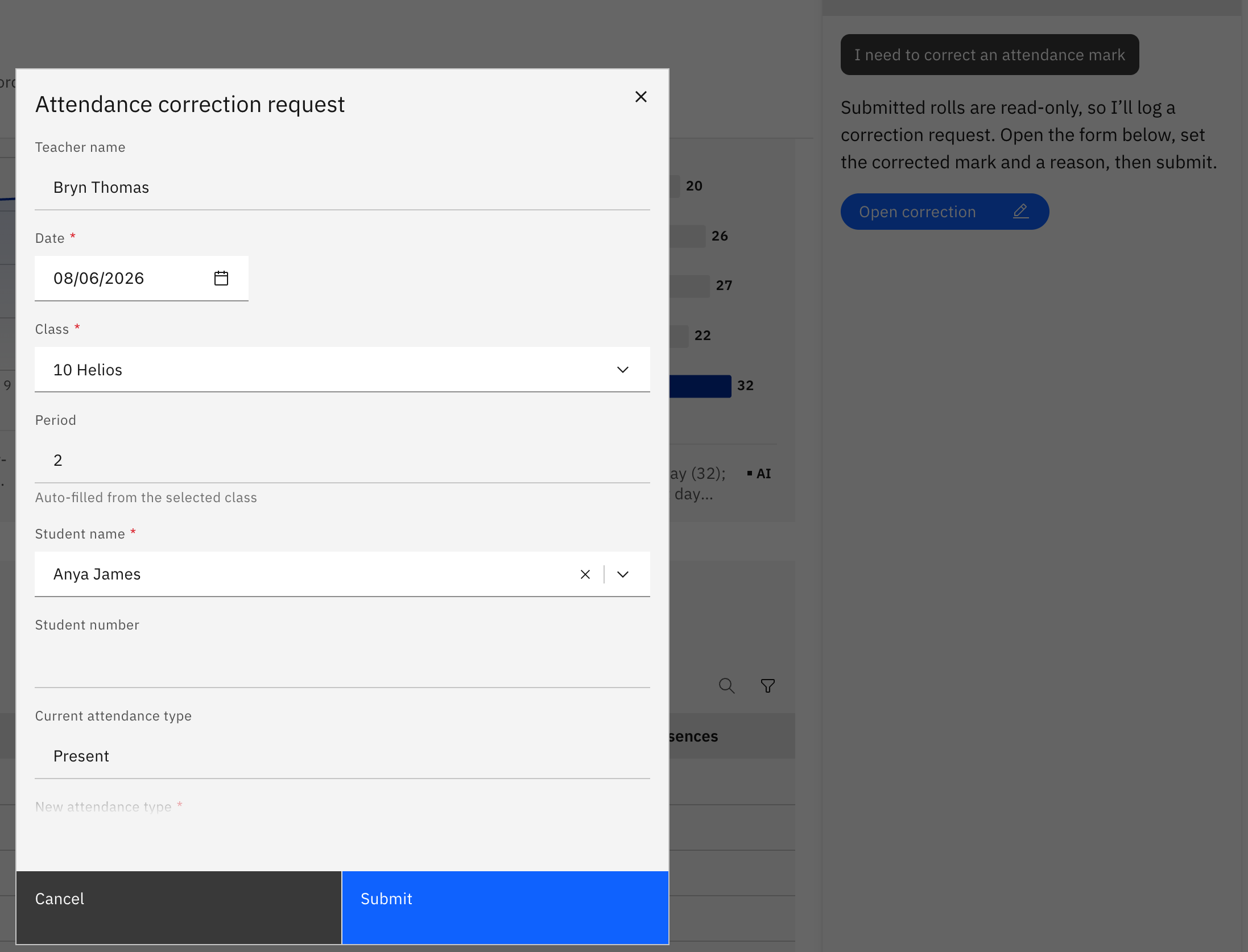
Set the corrected mark and reason
In the form, choose the corrected mark for the student and add a reason explaining the change, then submit.
Wait for an officer to resolve it
Your request goes to an attendance officer's Correction request tab, where they approve and apply the change. The correction request is the only way to change a submitted mark — you can't edit the locked roll yourself.