Mark a whole column at once
Quick answer
- On the roll, click the action control on today's column header.
- Choose mark all Present or mark all Absent to set every student at once.
- Use reset to clear your pending marks, then click Submit.
When most of a class is present, you can set today's whole column in one go instead of marking each student. This needs Attendance write access (the same access used to take a roll); for read-only staff the column control is hidden.
Open the column menu
On the roll, click the action control on today's column header. The menu reflects the column's current state.
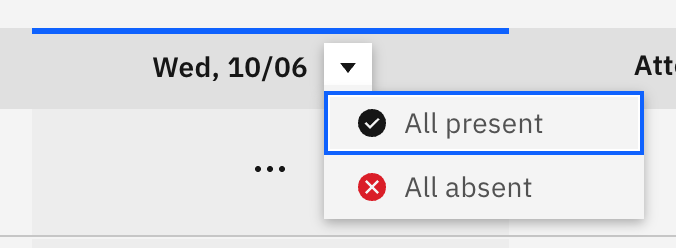
Mark everyone at once
Choose All present or All absent. Every student in today's column is set to that status, except any student who already holds an approved absence — bulk marking skips those, so it never overwrites a resolved absence.
Clear the column if needed
To start over, open the menu again and choose Reset, which clears your pending marks for today's column.
Submit the roll
Bulk marking doesn't save on its own. After the column is set, adjust any individual students as needed, then click Submit to send the roll.