See a student's day at a glance
Quick answer
- On the roll, click the expand chevron at the start of a student's row.
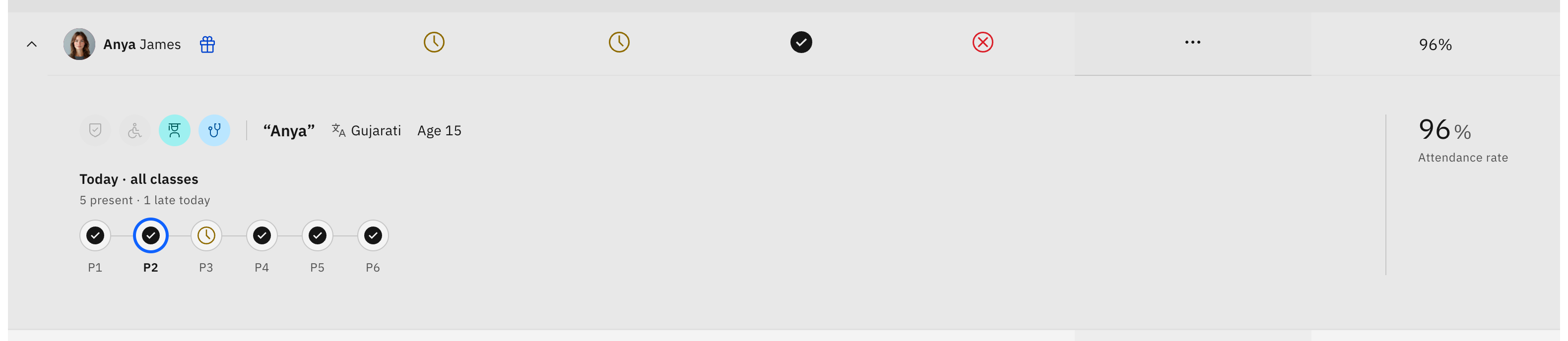
- See the student's preferred name, house, first language and age, plus any alert icons.
- Today · all classes shows their whole day across every class, with your period ringed.
- An Attendance rate big number sits on the right.
Each row on the roll opens a quick-glance card that shows the student's whole day across every class — not just your lesson.
Open the row
On the roll, click the expand chevron at the start of a student's row. The card loads its detail the moment you open it, so it may take a beat to appear.
Check any alerts
At the top of the card, alert icons flag safeguarding, medical, learning or custody concerns. Click an icon to read its detail.
Read the student context
The card shows the student's preferred name, house, first language and age where the school holds them.
See their whole day
Today · all classes is a timeline of every lesson the student has today, with your period ringed and a one-line summary such as "2 present · 1 late today". Because it's cross-class, it shows lessons you don't teach — so you can spot a student who's present in your class but absent later in the day.
Glance at their rate
An Attendance rate big number sits on the right of the card.