Start an emergency roll
Quick answer
- School-leader-only — the red Emergency button lives in the top app toolbar, not on an Attendance page.
- In the Initiate emergency protocol dialog, pick an Incident type (required) and optionally a Message to staff.
- Click Confirm to flip every teacher's roll into a stripped-down Emergency roll.
Declaring an emergency flips the whole school into evacuation/lockdown attendance: every teacher's roll switches to a fast headcount. Only a school leader can do this — other roles never see the Emergency button.
Click the red Emergency button
In the top app toolbar, click the red Emergency button. This control only appears for school leaders, so if you can't see it you don't have permission to declare an emergency.

Choose the incident type and message
In the Initiate emergency protocol dialog, choose an Incident type (required) and, if you want, type a Message to staff (up to 100 characters).
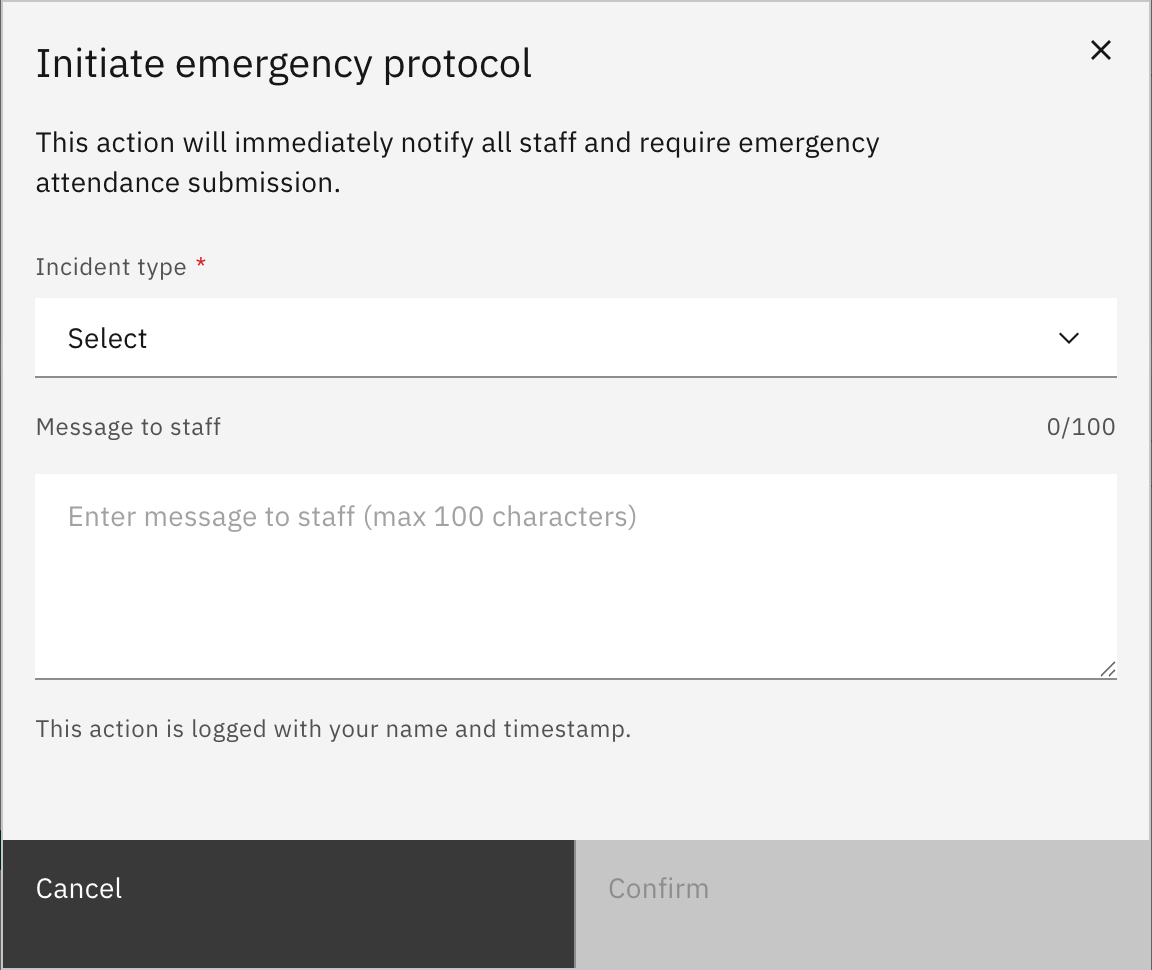
Confirm to start the emergency
Click Confirm. This immediately notifies all staff and turns every teacher's roll into a stripped-down Emergency roll, and the emergency-coordinator and muster-coordinator screens become available. The action is logged with your name and a timestamp.
Note: Confirming alerts everyone in the school at once and forces all staff into emergency attendance. Only declare a real emergency or a planned drill.