Add a student who isn't on your roll
Quick answer
- During an emergency, on the Emergency roll click Students not on roll.
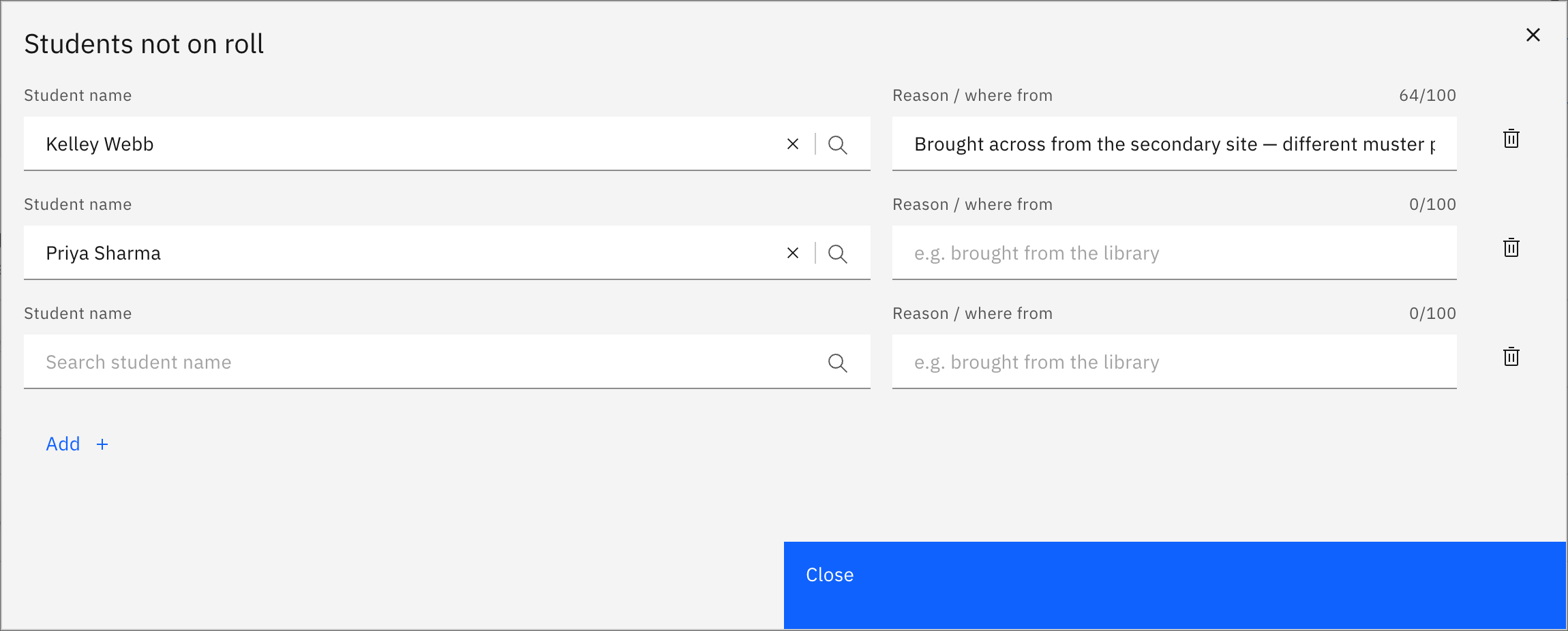
- In the modal click Add, search and pick the student, and add an optional reason.
- Added students appear in a Not on roll group, marked Present, and count toward your total.
When an emergency is declared, you take a stripped-down Emergency roll for your class. If a student who belongs to another class is physically with you, add them so they're accounted for in the headcount.
Open the off-roll list
On the Emergency roll, click Students not on roll. The button shows a live count once you've added anyone.

Add the student
In the modal, click Add, then search and pick the student. You can add an optional reason of up to 100 characters. The same student can't be added twice — try it and you'll get an Already added warning.
Check the off-roll group
Added students appear in a Not on roll group below your roll, each marked Present and counting toward your Present total. Every row has a Remove action and an Edit/add note action.
Remove one if needed
Click Remove on a row to take a student back off the list. A brief Undo appears if you remove someone by mistake.
Submit the roll
When everyone with you is accounted for, click Submit to send your class's emergency status, including the off-roll students.