Check resource bookings
Quick answer
- On the Activities overview, open the Booking status tab.
- Each row shows the Event, Resource, Quantity, Picked up by, Return date and Status.
- Search by event name and filter by booking status.
- It's a read-only view — you can't edit a booking here.
The Booking status tab on the Activities overview lists the equipment and resources booked against activities, so you can see what's reserved, who has it and when it's due back.
Open Booking status
On the Activities overview, open the Booking status tab. Any staff member with activity access can view it.
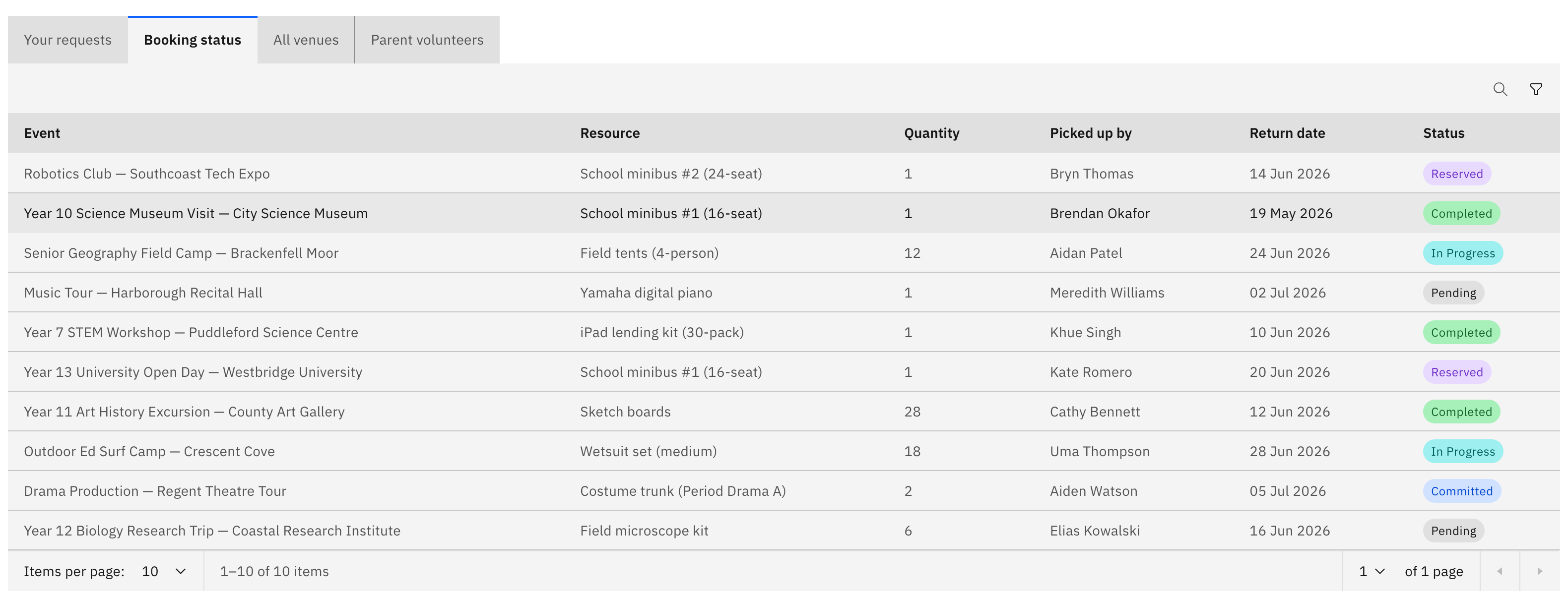
Read the table
Each row shows the booking's Event, the Resource booked, the Quantity, who it was Picked up by, its Return date and its Status.
Find a booking
Search by event name and filter by booking status to narrow the list down to the bookings you care about.
This tab is read-only — it shows the state of each booking but doesn't let you change one. Resources are booked from within an activity request, on its Resource booking step.