Find Your Way Around
Quick answer
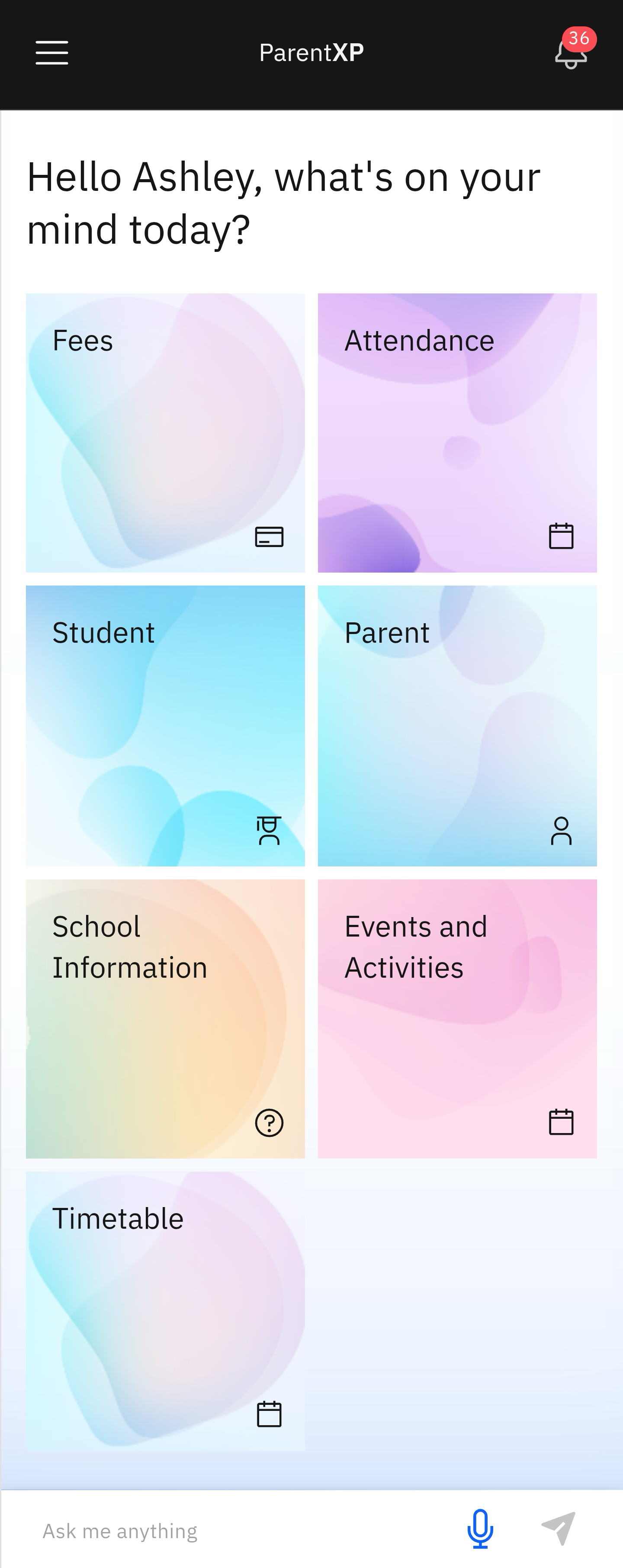
- The navigation bar runs across the top of the home screen.
- Use the tiles to access different parts of the app.
- There is a User hamburger menu on the left of the screen and a Notifications icon on the right.
Home screen and Subject tiles
After signing in, the home screen will appear. Here you will see the Navigation bar and the Action Tiles. Click a tile to perform a related task.
Use the Navigation Bar
The navigation bar runs across the top of the app at all times. A hamburger menu (≡) is on the left; here you can view Notifications, Topics, Settings, and GEMS Rewards. You can change the app's theme to dark or light mode, or both. At the bottom of the hamburger menu is the log out icon. On the right of the Navigation bar is a Notifications bell icon.

Asking Nova Questions
Nova is an intelligent chat agent that helps you complete different tasks in the PXP app. The Nova input box runs across the base of the app on any screen. Click on the Ask me anything space to type, or click the microphone icon to ask about a task. Click the arrow icon to receive instructions or support.

Note: To return to the home page from any screen, click the + on the right.