Import attendance data
Quick answer
- In D365, go to Data management ▸ Import, name the project, and select the TMRW HR time attendance entity.
- Upload the CSV of punch records and map the columns, including the code remark and device fields.
- Click Import, then check the loaded rows in Time and attendance ▸ Attendance log.
Attendance data reaches D365 as punch records — a clock-in and a clock-out per employee per day. An integration with the biometric system delivers these automatically, so you won't run this import daily or weekly. Use it when the integration isn't in place yet, or to correct or add records in bulk.
The Excel or CSV import below is how the data gets in.
Open a data import project
In D365, go to System administration ▸ Workspaces ▸ Data management and click Import.
Name the project
Give the project a Group name. If you are duplicating an existing project, give it a different name so you don't overwrite the original.
Select the entity and file type
Set the file type to CSV and select the Time and attendance entity.
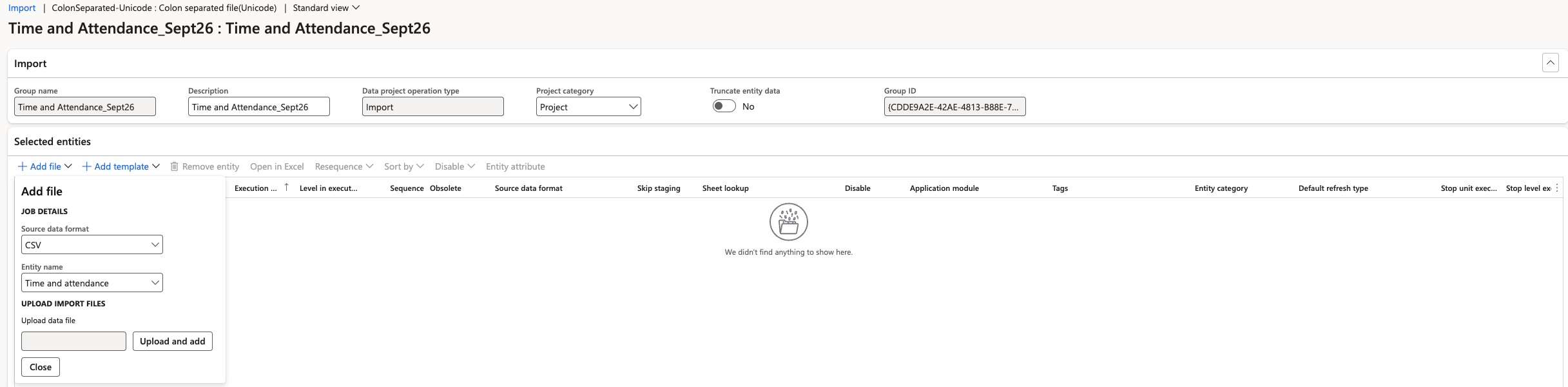
Upload the file
Click Upload and select your file, then apply it to the project.
Map the remaining columns
You may see a warning that the entity is not fully mapped. Map any outstanding fields — the code remark, the timestamp, the device ID and the device location — then apply the mapping.
Run the import
Click Import now. The file loads into the attendance log table.
Check the loaded records
Go to Time and attendance ▸ Inquiries and reports ▸ Attendance ▸ Attendance log and review what came in. Each row holds the entry date, employee ID, clock-in date and time, code remark in, any remark passed through from the time and attendance clock, the clock-out date and time, and the location and device it was recorded on.

Work duration is not calculated at this point. The attendance log is only the raw record of a punch-in and punch-out—durations, regular minutes, and overtime are calculated by the summary batch job.
To run the summary, see Run the attendance summary batch job.