Configure time and attendance parameters
Quick answer
- In D365, go to Human Resources ▸ Setup ▸ Human resources parameters ▸ General and set the attendance and overtime hierarchies.
- Pick a hierarchy for each so approvals can route to a designated attendance or overtime manager instead of the line manager.
- In Human resources shared parameters, set the minimum overtime threshold so short daily overruns are not raised for approval.
Two parameter settings drive the whole time and attendance process: the hierarchies that decide who approves attendance and overtime, and the threshold below which overtime is not worth raising. Set both before you load any attendance data.
Open the human resource parameters
In D365, go to Human Resources ▸ Setup ▸ Human resources parameters and open the General tab.
Set the attendance and overtime hierarchies
In the hierarchy area, you will find two fields — one for Attendance and one for Overtime. Select the position hierarchy you want each to use.
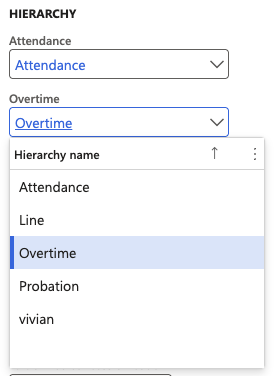
These exist because the person who approves attendance is not always the line manager. If a separate designated employee handles attendance or overtime, the hierarchy you select here routes it, and you assign individuals to that hierarchy based on their position. If the line manager approves attendance and overtime, you can point both fields to the line hierarchy—there is no problem with that.
Save the parameters
Click Save.
Set the minimum overtime threshold
Go to Human Resources ▸ Setup ▸ Human resources shared parameters and enter the minimum number of minutes to treat as overtime.
Anything below the value you enter here will not show up as overtime. This keeps trivial daily overruns—five minutes past the end of a shift, for example—out of the overtime forms so approvers see only overtime that matters.

Save the shared parameters
Click Save. The threshold applies from the next run of the attendance summary batch job.
Next, put people into those hierarchies — see Assign attendance and overtime managers to a position.