Configure the growth and performance matrix
Quick answer
- In D365, search for Growth and performance matrix and open the setup.
- Each box in the matrix carries a rating and a measure description, and where each one sits on the grid is configurable.
- A given value can only be placed in one box — the system enforces that as you build the grid.
The growth and performance matrix is the grid employees are placed on during the year — GEMS Star, High Performer, Inconsistent - Talent Risk and the rest. Each measure occupies a box on the matrix, the employee gets rated into a particular box.
The layout is not fixed. Each measure's position on the grid is configurable, so you can match the matrix to the framework your organisation has agreed.
Open the matrix setup
In D365, type Growth and performance matrix into the search box at the top of the screen and open the result. Or follow the pathway: Human resources ▸ Competencies ▸ Setup ▸ Growth and performance matrix.
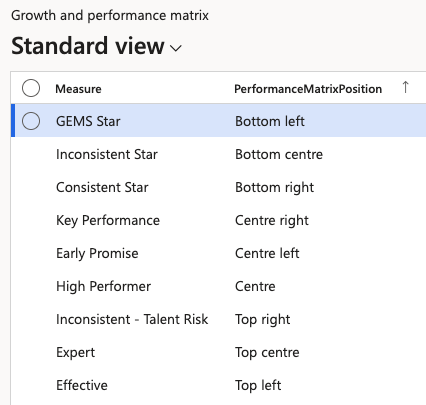
Review the measures
The matrix defines the Measures and identifies their Performance Matrix Positions. The positions of each measure can be edited
Keep each value to one box
Define each value only once across the matrix—the system enforces this, so you cannot place the same measure in two boxes. If you are moving measures around, clear a value from its old position before reusing it.
This form configures the matrix but is not where you use it. HR and managers place employees on the matrix and move them between boxes from the manager view in ESS — see Use the growth and performance matrix in the ESS guide. The placements made there are written back to the employee's talent review record in D365, covered in View talent review records.