Configure personnel action types for onboarding
Quick answer
- Search for and open Personnel action types in D365.
- Locate the hire action type and enable the Apply onboarding checklist flag.
- Click Save.
The Personnel action types form controls which hire action types automatically trigger an onboarding checklist when a worker completes an action. Enable this flag on each relevant action type.
Open Personnel action types
In D365, search for and open Personnel action types.
Locate the hire action type
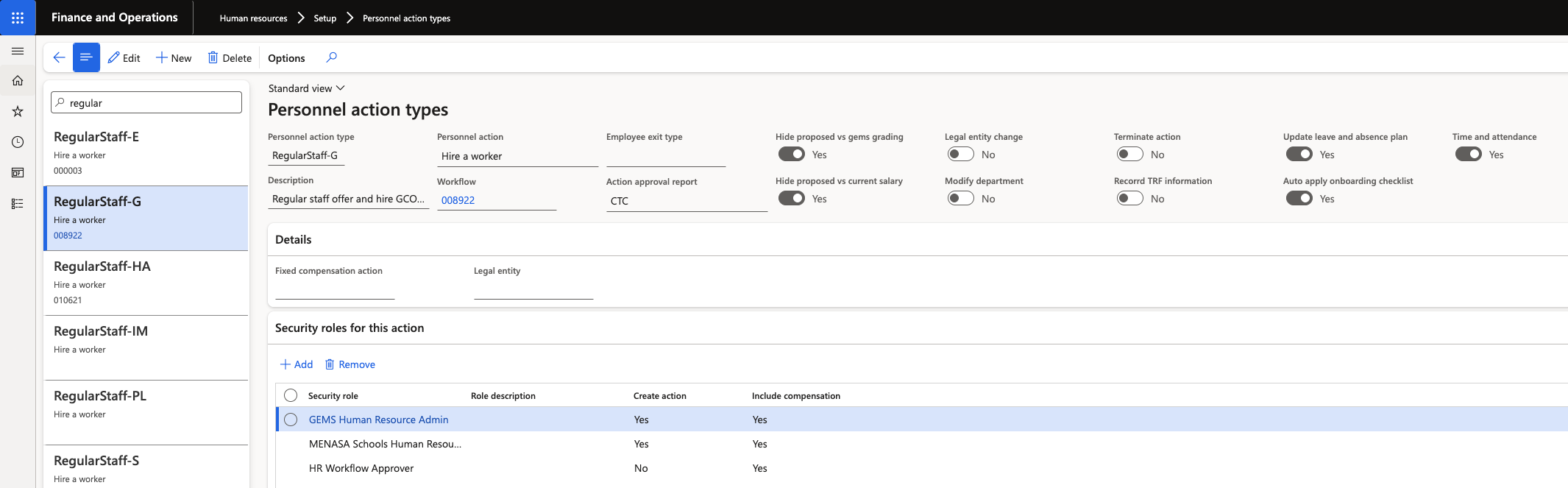
Filter or scroll to find the action type used for new hires — for example, Regular.
Enable the checklist flag
Enable the Auto apply onboarding checklist flag for this action type. When a worker completes this action type, the system automatically applies the nominated onboarding checklist to the new employee record.
Save
Click Save.
Repeat for any additional action types that should trigger onboarding checklist assignment.