Update leave plans through a promotion action
Quick answer
- Confirm the promotion personnel action type has Update leave and absence plan set to Yes.
- Assign the new position — its staff level and staff category determine the leave plans.
- Once the workflow completes, the plans for the new staff level are added to the employee.
When an employee moves to a new position, the leave plans attached to their new staff level are applied. The mechanism is the same as the hire action — the flag on the personnel action type makes it happen.
Check the leave plans on both staff levels
Before submitting, open the Staff level form from the pathway: Human resources ▸ Setup ▸ Staff levels. Note the leave plans held against the employee's current staff level and against the one they are moving to. This tells you what to expect after the action completes.
For example, an employee moving from an education admin staff level to a school admin staff level picks up whichever plans are configured for that legal entity under the new level.
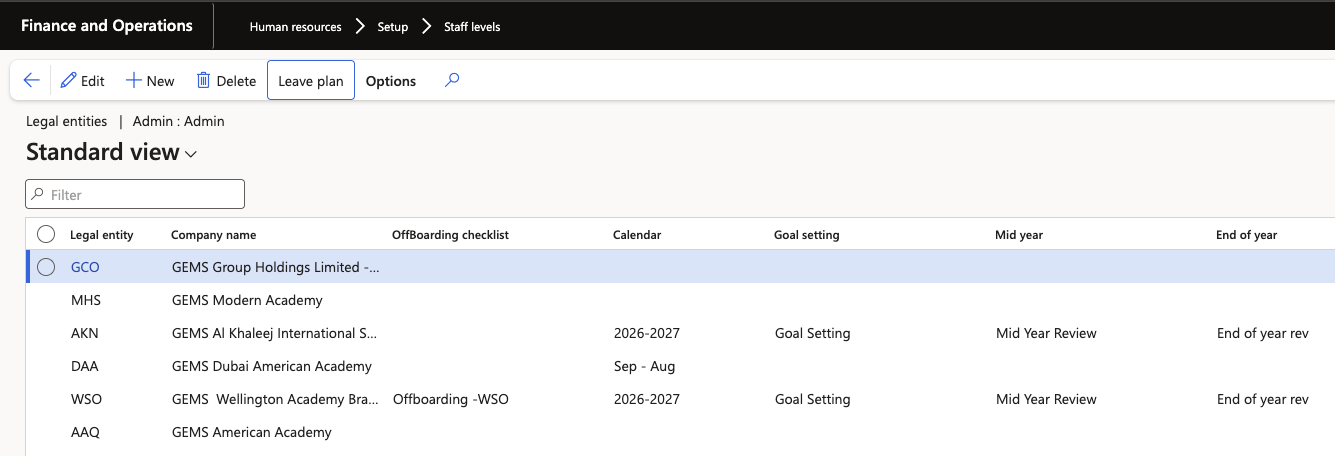
Confirm the flag on the personnel action type
Open the personnel action type used for the promotion and confirm Update leave and absence plan is set to Yes. Without it, the position changes but the leave enrolment does not.
Create the promotion action
Create the promotion worker action for the employee and complete the position assignment with the new position. The position carries the staff category and staff level that drive the leave plan assignment.
Submit and approve the workflow
Submit the action to workflow and approve it. Wait for the header status to move from Pending to completed.
Confirm the new position and enrolment
Open the employee record and check the position assignment — you should see both position records where the previous position is still active. Then open Leave and absence to confirm the plans for the new staff level have been added.

Retire the previous position where your process requires it
A promotion adds the new plan alongside the existing enrolment. Where your process is to retire the previous position, retiring it also retires the plans attached to it — leaving the employee on the new staff level's plans only.
Confirm which approach your schools follow before running promotions in bulk, so enrolments do not accumulate across old positions.