Configure sick leave certificate rules
Quick answer
- On the leave type, set the outside probation certificate threshold in days.
- Employees within probation must attach a certificate to any request of that type.
- Confirmed employees are only asked for one once the absence exceeds the threshold.
Certificate rules control when ESS requires a supporting document before it accepts a leave request. The rule is set per leave type, can differ by school, and applies differently depending on whether the employee has passed probation.
Open the leave type
In D365, go to Leave and absence ▸ Setup ▸ Leave and absence types and open the type you are configuring — typically sick leave.
Set the certificate threshold
Complete the Outside probation certificate threshold in days. This is the number of days an absence can run before a medical certificate becomes mandatory for a confirmed employee — three days, for example.
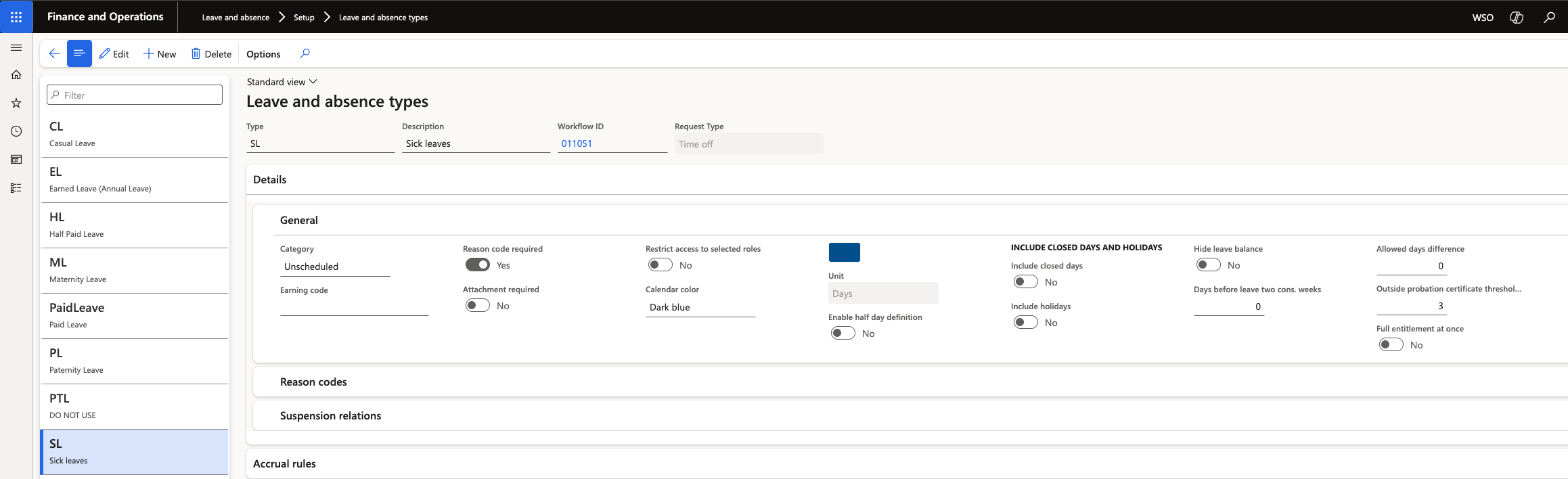
The value is set per legal entity, so each school can apply its own policy.
Understand how probation status changes the rule
The employee's probation status on their work history determines which rule applies:
Probation status Behaviour in ESS Pending confirmation A certificate is required for any request of this type, from the first day. Submitting without one returns Sick leave requires at least one document to be attached to the leave request Confirmed A certificate is only required once the absence exceeds the threshold. Shorter requests can be submitted without one Save
Click Save. The rule applies to new ESS submissions immediately.
The same mechanism works for any leave type, not only sick leave. Set a threshold in days against the type, and ESS starts enforcing an attachment once a request goes beyond that number.