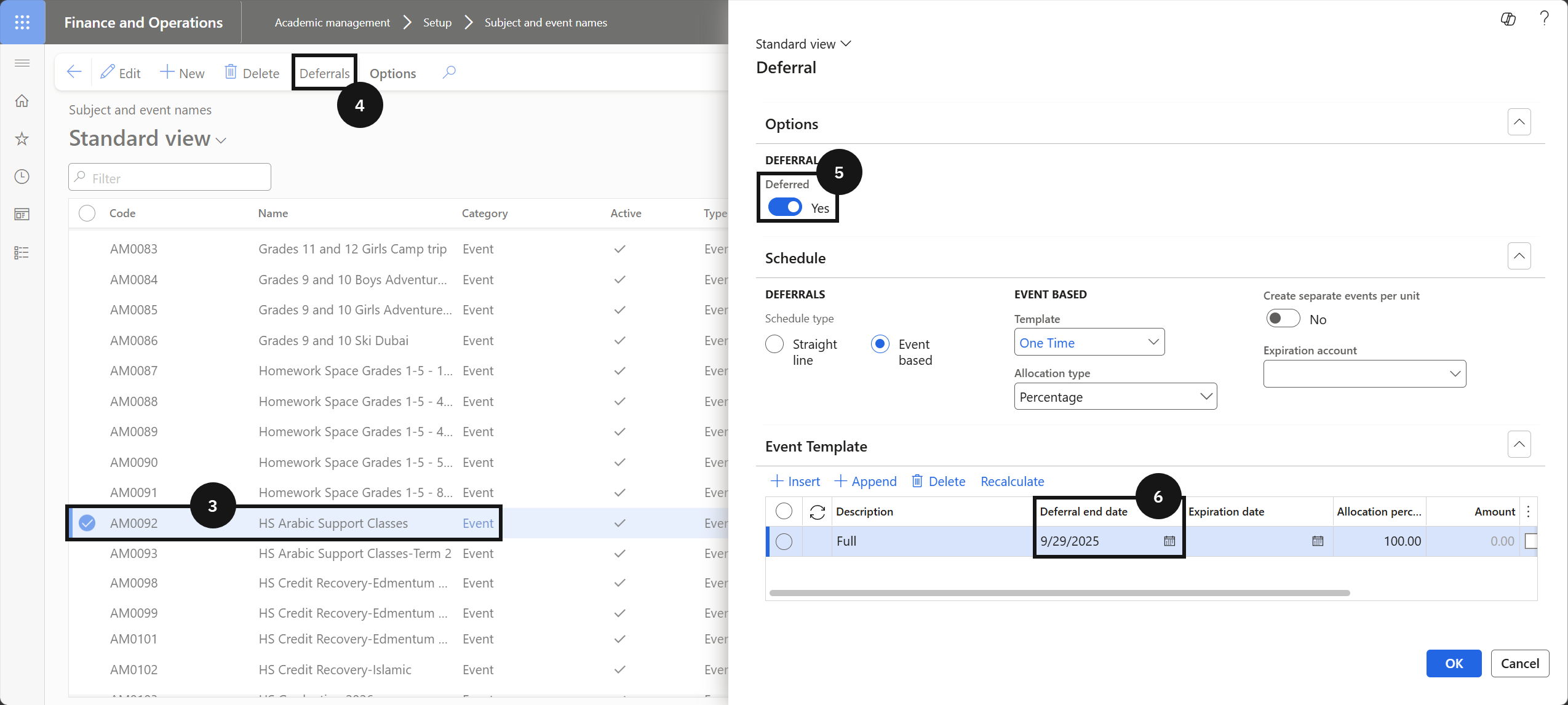
Set the Deferral Date
Quick answer
- Locate the event in Academic Management ▸ Setup ▸ Subject and event names, click Deferrals, enable Deferred, and set the Deferral date to the event date.
- Until that date the charge is held in a deferred revenue account; once it passes the balance transfers to the main revenue account.
A deferral date must be set against the event record before generating invoices. Until that date the charge is held in a deferred revenue account; once the event date passes, the system automatically transfers the balance to the main revenue account.
Open the event record
From the FNO dashboard, open Modules ▸ Academic Management, expand Setup, and click Subject and event names. Locate and select the relevant event record.
Set the deferral date
Click Deferrals, enable the Deferred toggle, and set the Deferral date to the event date. Click OK.