Generate the Session Adjustment
Quick answer
- Run Academic Management ▸ Periodic tasks ▸ Generate sessional class and event adjustments, enter the adjustment date, filter for the student if needed, and click OK.
- The system creates a new sales order reflecting the correct session count and adjusted amount.
Run this task after updating the session record status to Changed.
Run the adjustment task
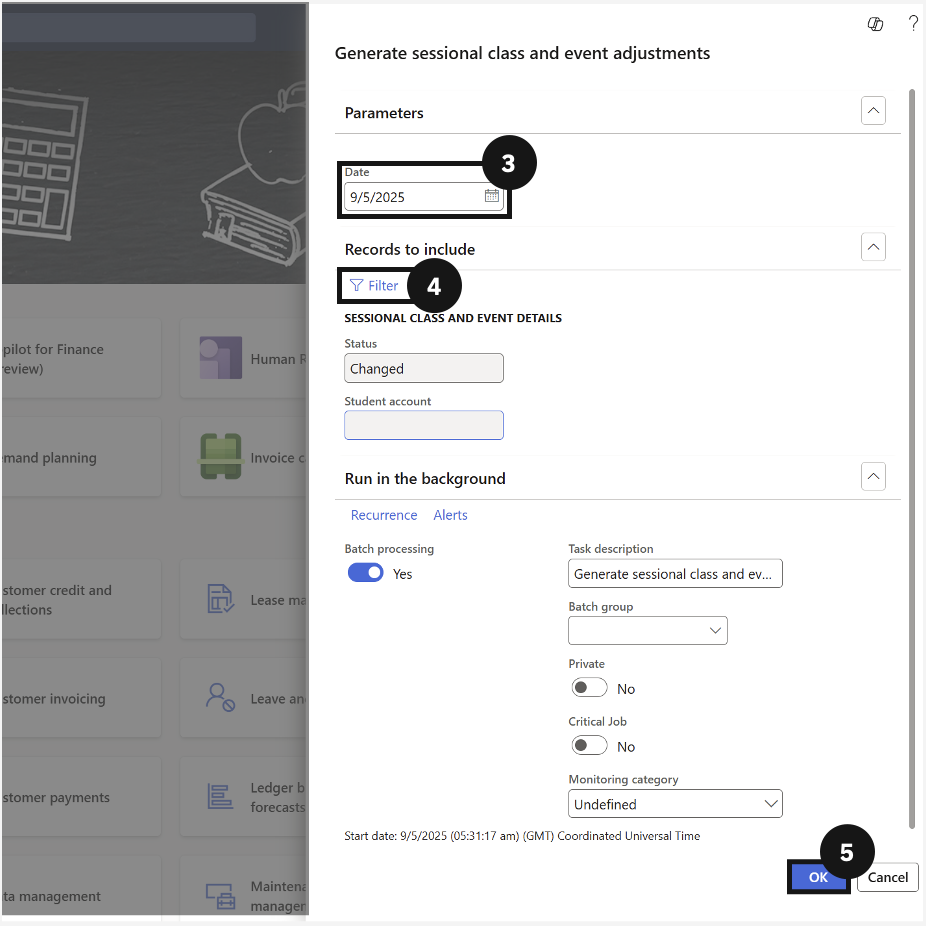
From the FNO dashboard, open Modules ▸ Academic Management, expand Periodic tasks, and click Generate sessional class and event adjustments. Enter the adjustment Date (③), and expand Records to include to filter (④) for a specific student if needed (leave blank to process all records with a Changed status). Click OK (⑤).
The system creates a new sales order reflecting the correct session count and the adjusted charge amount.