Create an Event Fee Schedule Template
Quick answer
- Open Academic Management ▸ Fee schedules ▸ All fee schedules and click New.
- Enter a description, choose the billing interval, add fee lines, configure conditions if needed, then Save.
Before the fee generation batch can invoice students for sessional classes or events, a fee schedule template specific to the event must be in place. Event templates are set up the same way as standard fee schedule templates but are configured with the event-specific billing interval and fee item.
Open All fee schedules and create a new template
From the FNO dashboard, open Modules ▸ Academic Management, expand Fee schedules, and click All fee schedules. Click New in the Action Pane.
Complete the template header and fee lines
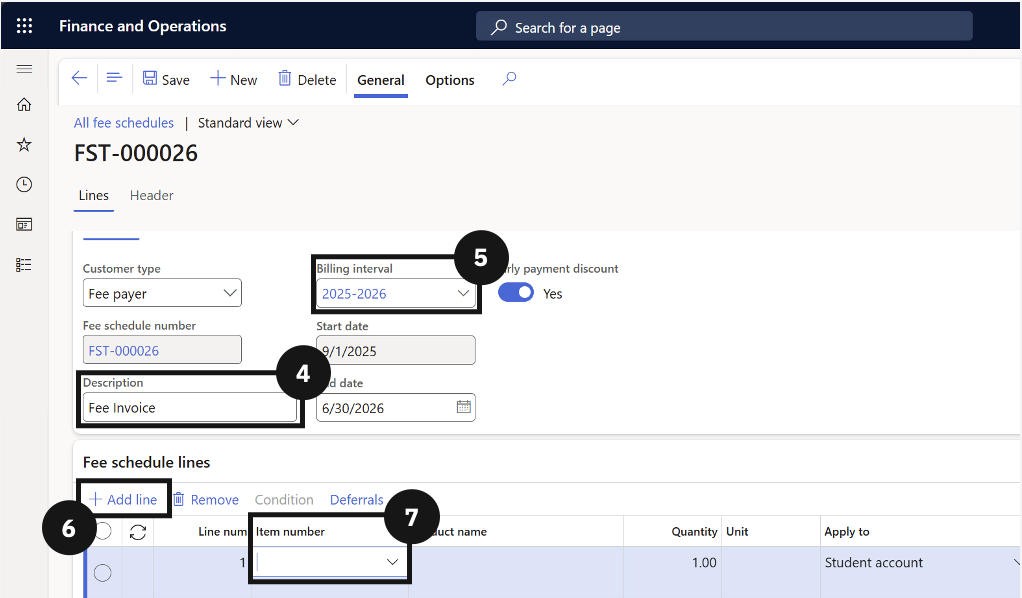
Enter a Description (e.g., Event template) (④) and choose the Billing interval (⑤). Click + Add line (⑥) and complete the required fields for each line. If required, a Condition can be added to restrict the template to specific event codes or student groups.
Save
Click Save.