Set Up Sibling Order
Quick answer
- Open Academic Management ▸ Setup ▸ Sibling setup ▸ Sibling order, click New, and add a sibling discount order number and description.
- Add a new record only if your school needs more sibling positions than the ones already listed.
For each possible child in a family, a sibling order number is assigned (e.g., 1 for first child, 2 for second). Use 0 for students who are not yet current (e.g., future students or those transitioning between programmes). Add a new record only if your school needs more sibling positions than those already listed.
Open Sibling order and create a new entry
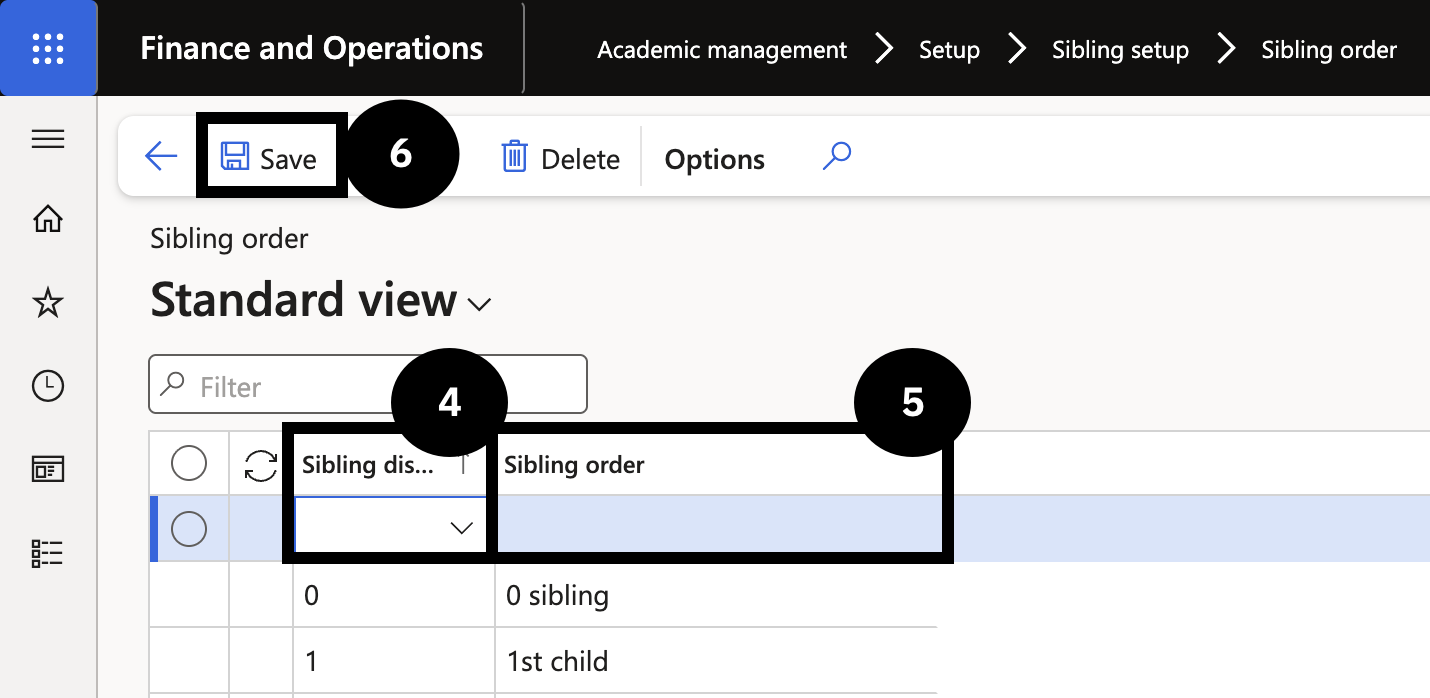
From the FNO dashboard, open Modules ▸ Academic management, expand Setup and Sibling setup, then click Sibling order. Click New and complete the following:
- Sibling discount order (④) — enter a unique number (e.g., 11). Follow your school's sequencing convention.
- Sibling order (⑤) description — enter a matching description (e.g., 11th Child). Use the same pattern as existing records.
Save
Click Save (⑥).