Set Up Fee Type
Quick answer
- Open Academic Management ▸ Setup ▸ Cashier receipt ▸ Fee type, click New, enter the fee type code, account, tax group, and tax item group, then save.
- When a fee type is selected during cashier or miscellaneous receipt processing, the system automatically populates payment type, financial dimensions, and accounting postings.
Fee types define the default general ledger account and tax postings for miscellaneous receipts. When a fee type is selected during processing, the system applies those postings automatically, removing the need for manual account selection at the time of payment.
Open Fee type and create a new entry
From the FNO dashboard, open Modules ▸ Academic management, expand Setup, then expand Cashier receipt, and click Fee type. Review the list of existing types to avoid creating duplicates.
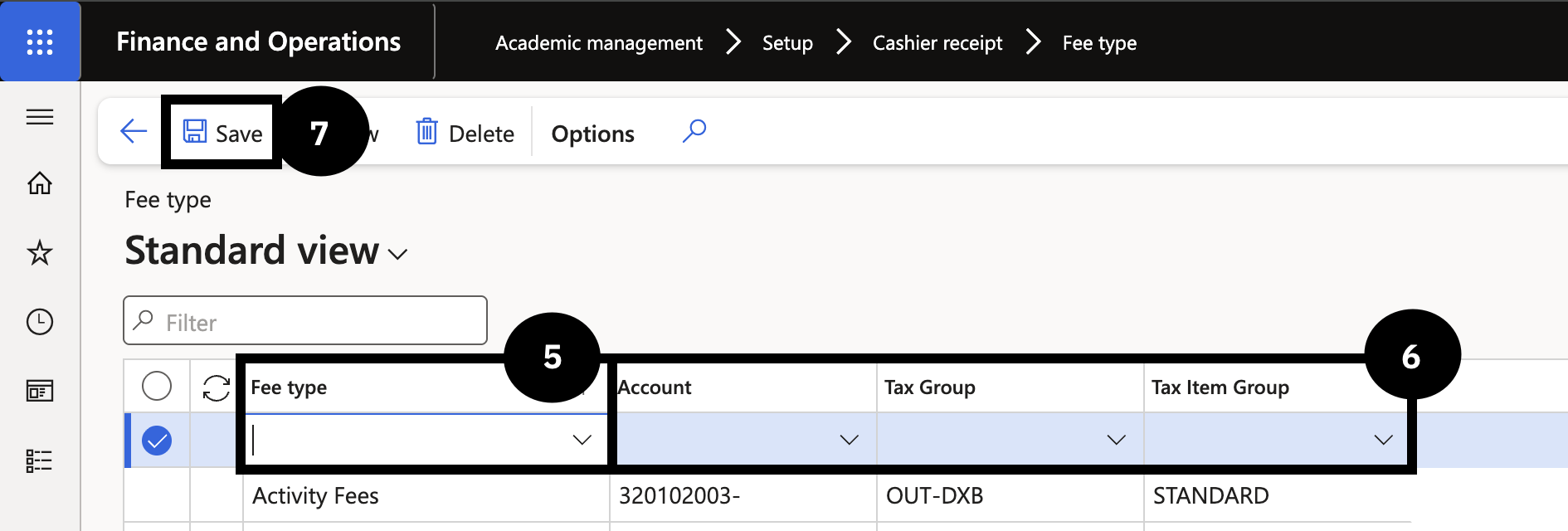
Click New in the toolbar and complete the following:
- Fee type (⑤) — enter a value (e.g., Security deposit, Transport).
- Account — select the general ledger account (e.g., Transport fee).
- Tax Group — select the appropriate tax group.
- Tax Item Group — select the appropriate tax item group (⑥).
Save
Click Save (⑦).