Set Up Deposit Policy
Quick answer
- Open Academic Management ▸ Setup ▸ Deposit policy, click New, select the pre-admission type, deposit type (Percent or Fixed), and enter the value, then Save.
- If using the percentage deposit type, the percentage is calculated from the tuition fee linked to the selected academic year.
The deposit policy defines the amount charged to fee payers at enrolment or re-enrolment, before the full fee schedule is generated. Deposits can be configured as either a fixed amount or a percentage of the annual tuition fee linked to the relevant academic year.
Create deposit policy records
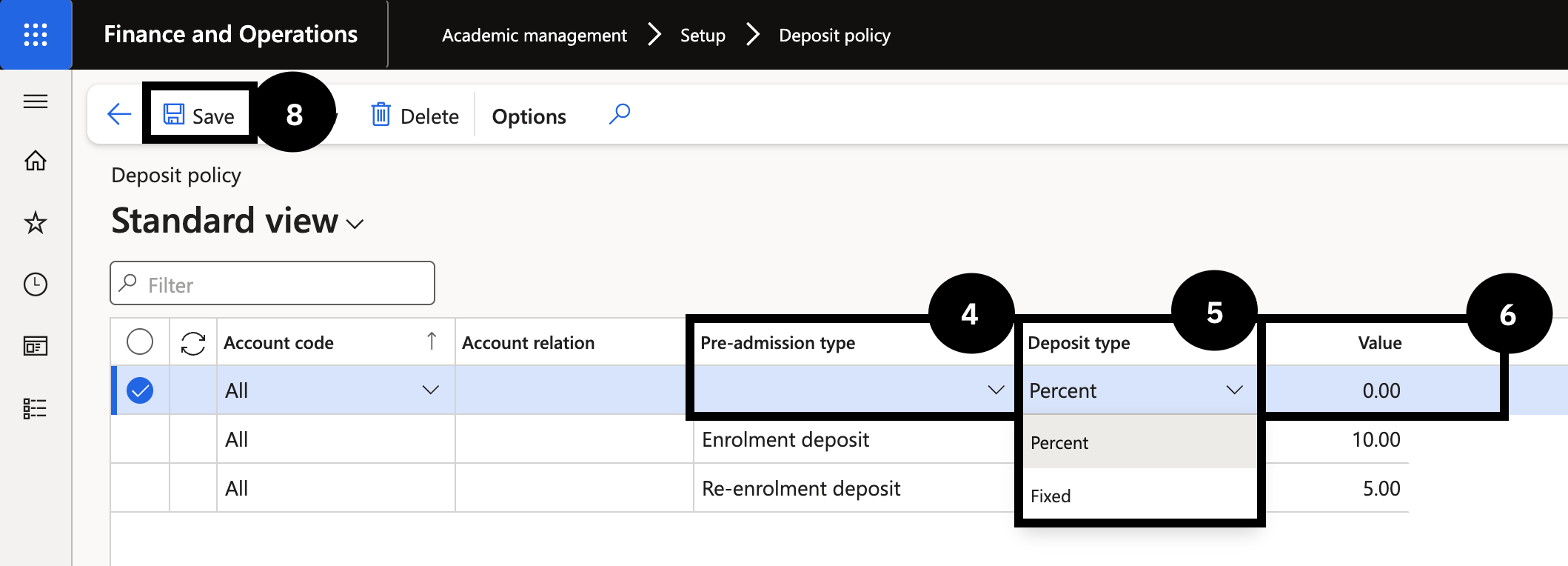
From the FNO dashboard, open Modules ▸ Academic management, expand Setup, and click Deposit policy. Click New in the toolbar and complete the following:
- Pre-admission type (④) — select the appropriate deposit from the dropdown.
- Deposit type (⑤) — select Percent or Fixed.
- Value (⑥) — enter the deposit amount or percentage for the selected type.
Repeat for each deposit type that needs to be set up.
Save
Click Save (⑧).