Set Up Pre-Admission Types
Quick answer
- Open Academic Management ▸ Setup ▸ Pre-admission fees ▸ Pre-admission types and click New.
- Enter the Pre-admission type, Description, and tick Deposit if the type represents an enrolment deposit.
- Click Save. Pre-admission types must be created before posting rules can be configured.
Pre-admission types define the category of fee or deposit being collected before a student is formally enrolled. Each type must be created before the corresponding posting rules can be configured.
Transaction type reference:
- General journal — used when there is no student record yet; records the fee as other income directly to the general ledger. Typically used for application fees.
- Free text invoice — used when a student record exists and immediate posting to a liability account is required. Typically used for enrolment fees.
- Sales order — used when a student record exists and a sales order invoice is required.
- Prepayment invoice — used to record an enrolment or re-enrolment deposit, settled against the tuition fee invoice once finalised.
Open Pre-admission types
From the FNO dashboard, open Modules ▸ Academic Management, expand Setup, then expand Pre-admission fees, and click Pre-admission types. Review the existing types before proceeding to avoid creating duplicates.
Create a new type
Click New in the toolbar and complete the following:
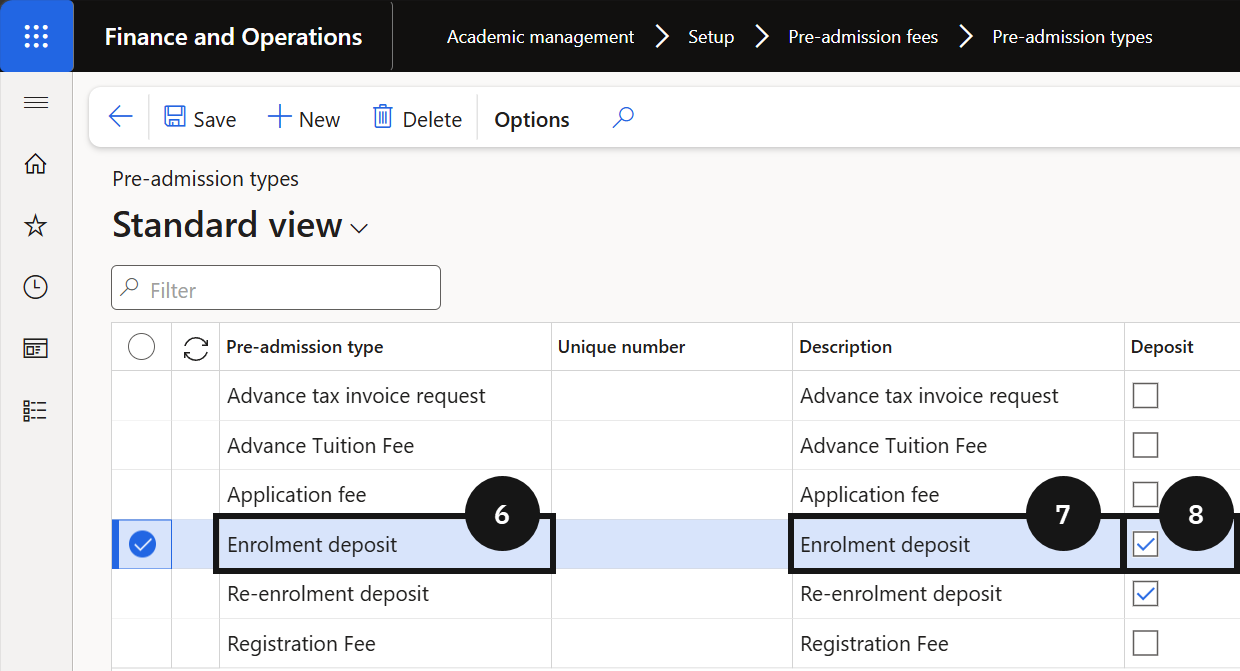
- Pre-admission type (⑥) — enter a value (e.g., Application fee, Enrolment fee).
- Description (⑦) — enter a matching value. In most cases, match the description to the type name for easier identification.
- Deposit (⑧) — tick this checkbox only when the type represents a deposit (e.g., Enrolment deposit).
Save
Click Save.