Set Up Pre-Admission Posting
Quick answer
- Open Academic Management ▸ Setup ▸ Pre-admission fees ▸ Pre-admission posting and add an entry for each pre-admission type.
- For each entry, select the account entry, posting profile, receipt journal name, and sales category. For Enrolment Deposit and Re-enrolment Deposit types, do not select an item number.
Pre-admission posting rules define how each fee type is recorded in the general ledger when it is posted. You must create a posting entry for each pre-admission type created in Set Up Pre-Admission Types.
Open Pre-admission posting
From the FNO dashboard, open Modules ▸ Academic Management, expand Setup, then expand Pre-admission fees, and click Pre-admission posting.
Add a posting entry for each type
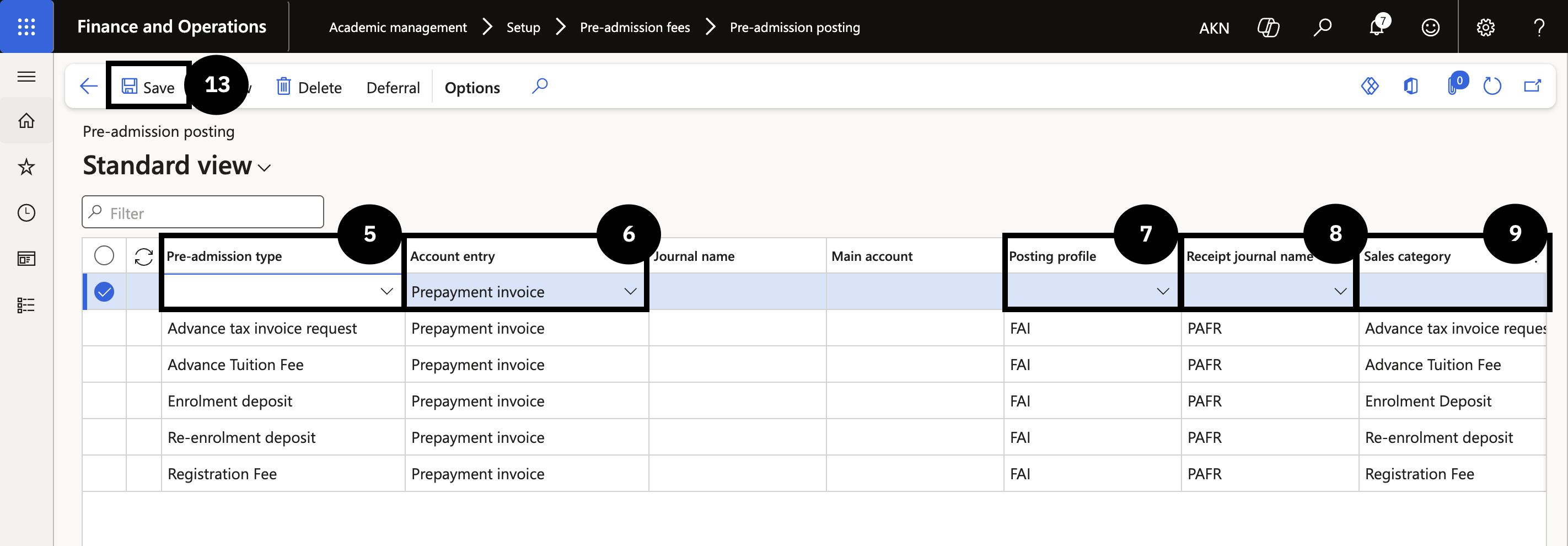
Click New in the Action Pane and complete the following columns for each pre-admission type:
- Pre-admission type (⑤) — select the type (e.g., Application fee, Enrolment fee).
- Account entry (⑥) — select Sales order, Free text invoice, or General journal as appropriate.
- Posting profile (⑦) — select the posting profile.
- Receipt journal name (⑧) — select the receipt journal that applies to online payments for this type.
- Sales category (⑨) — select a unique sales category. Do not use the same category for multiple pre-admission types.
- Item number — select an item number for application or registration fees. For Enrolment Deposit and Re-enrolment Deposit types, leave this blank — the system generates an open sales order header for fee generation.
Click New again to add the next type and repeat until all types are configured.
Save
Click Save (⑬).