Number of Siblings by Family Report
Quick answer
- Open Academic Management ▸ Inquiries and reports ▸ Students and families ▸ Number of siblings by family details.
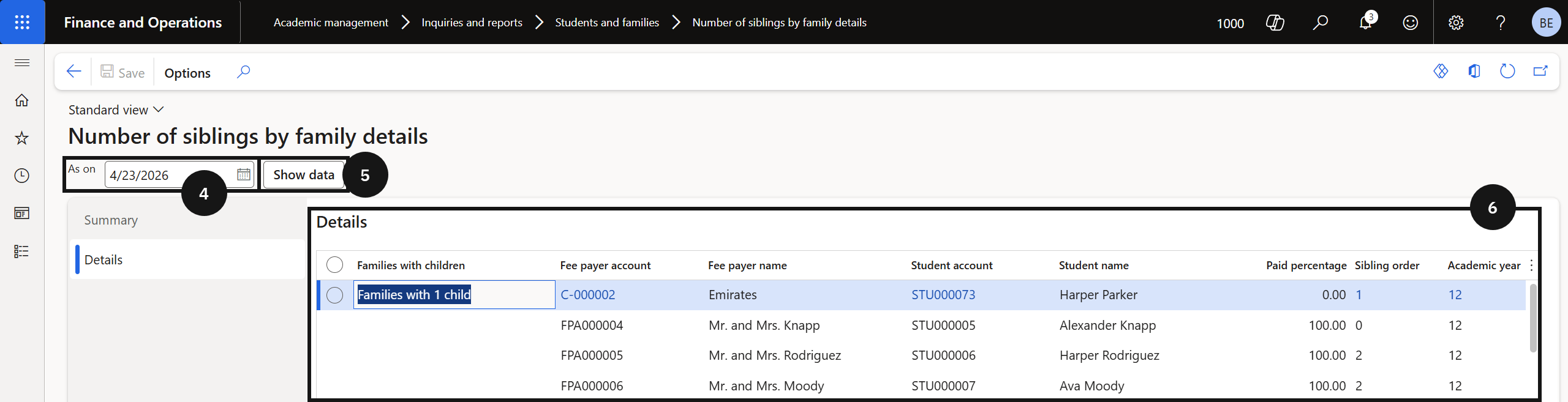
- Enter a date in the As on field, click Show data, and review the sibling count per family.
The Number of Siblings by Family report shows how many siblings are enrolled per family as of a selected date. Use this to support sibling discount processing and fee payer management.
Open the report
From the FNO dashboard, open Modules ▸ Academic Management, expand Inquiries and reports, expand Students and families, and click Number of siblings by family details.
Filter and review
Enter the relevant date in the As on (④) field and click Show data (⑤) to load results. The report shows the sibling count per family as of that date (⑥).