Simulate an Advance Discount
Quick answer
- Open Academic Management ▸ Inquiry and Report ▸ Co-branded transactions ▸ Advanced Discount Policy, enter the student account, select the co-branded method, enter the amount to simulate, and click Simulate.
- This tool does not create a transaction — it shows the discount rate and amount for calculation and agreement purposes only.
The advance discount simulation tool calculates the discount a fee payer would receive for a given payment amount without creating any transaction. Useful when a family wants to understand their discount entitlement before committing to an advance payment.
Open the simulation tool and enter the parameters
From the FNO dashboard, open Modules ▸ Academic Management, expand Inquiry and Report, expand Co-branded transactions, and click Advanced Discount Policy.
Complete the following:
- Customer (③) — enter the student account.
- Method of Payment (④) — select the co-branded method.
- Amount (⑤) — enter the amount to simulate. Enter a single term amount, a two-term total, or the full period total to compare discount rates.
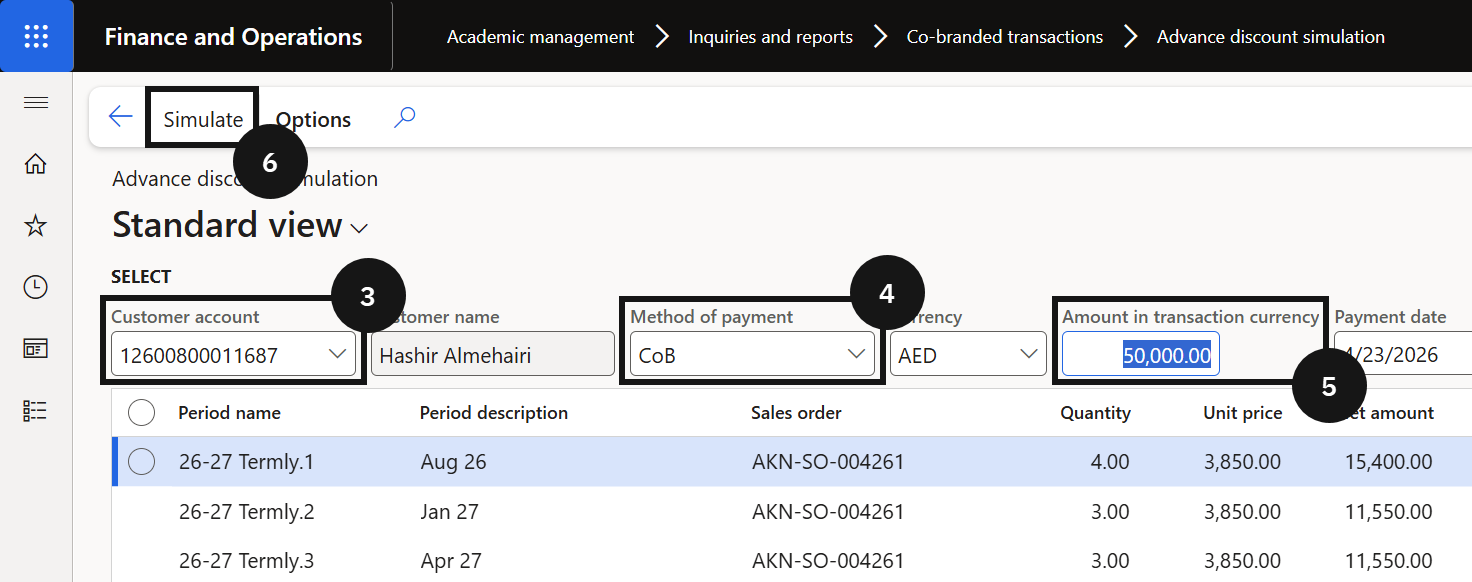
Simulate
Click Simulate (⑥). The system displays the discount rate and amount that would apply for the entered amount. No transaction is created.