Generate Fee Statements in Bulk
Quick answer
- Open Academic Management ▸ Inquiries and reports ▸ Fee payer statement report ▸ Fee payer account statement, enter the date range, optionally filter for the account, and click OK.
Fee payer account statements provide a consolidated view of outstanding invoices, credits, and payment history over a defined period. Typically distributed ahead of payment deadlines to give families a clear picture of what is owed.
Open Fee payer account statement and set parameters
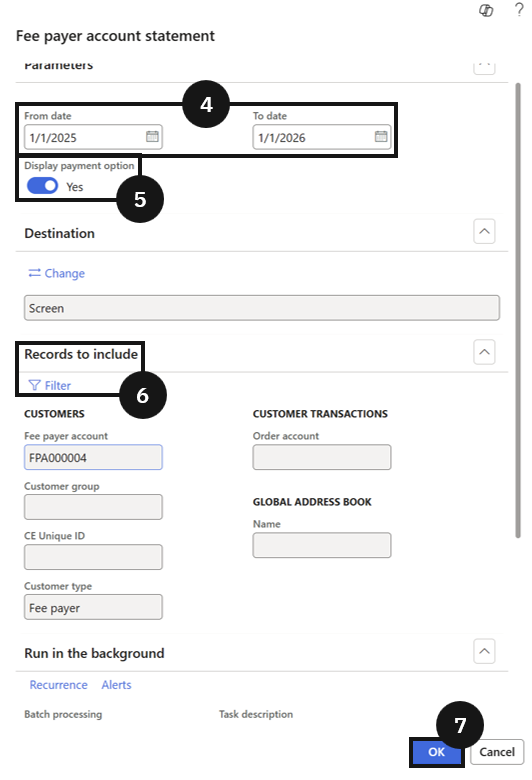
From the FNO dashboard, open Modules ▸ Academic Management, expand Inquiries and reports, then expand Fee payer statement report, and click Fee payer account statement. Complete the following:
- From date and To date (④) — enter the date range for the statement period.
- Display payment options (⑤) — select whether to show payment options on the statement.
In Records to include, click Filter to choose a specific account (⑥). Leave blank to generate for all eligible accounts.
Generate and distribute
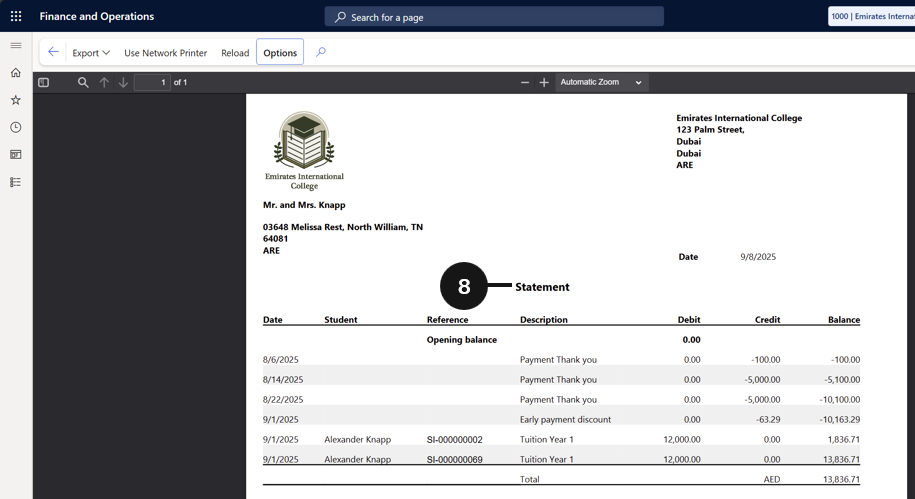
Click OK to generate the statement (⑦). Review the completed statement (⑧) and distribute it to the fee payer as required.