Confirm Bank Account Details
Quick answer
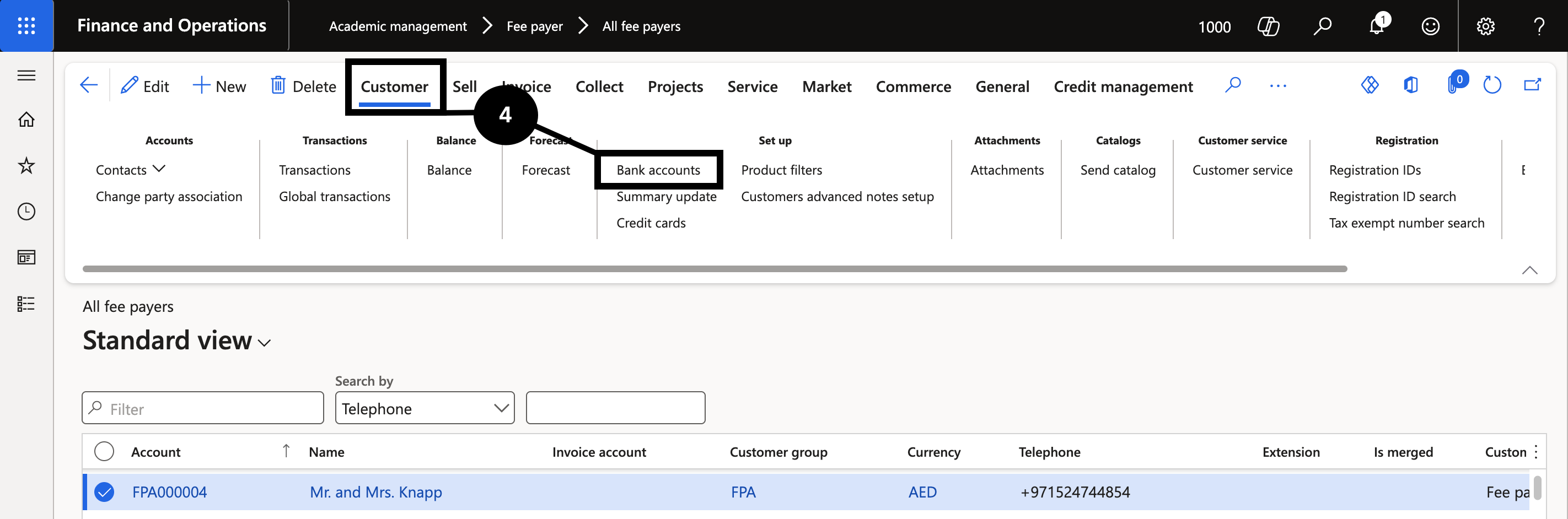
- Open the student or fee payer record, click Customer ▸ Setup ▸ Bank accounts, and confirm an active bank account is marked for refunds. If none exists, click New and enter the bank details.
- Confirm bank details before processing any bank file refund.
Confirm a fee payer's bank details before paying any refund via bank file.
Open the bank accounts and verify
Navigate to Modules ▸ Academic management ▸ Students ▸ All students (or Fee payer if using fee payer as the customer). Select the relevant record. On the Action Pane, click Customer, then under Setup find Bank accounts (④).
Confirm that an active bank account exists and is marked for refunds or payment processing.
If no bank account is listed, click New, enter the bank details (bank name, IBAN, SWIFT, currency), then click Save. If necessary, update an existing bank account and click Save.