Configure an Advance Payment Discount — Date-Based
Quick answer
- Open Accounts receivable ▸ Payment setup ▸ Cash discounts, click New, enter the discount code, description, percentage or fixed discount amount, and assign the main account, then save.
- The discount is triggered by the payment date — if payment is received on or before the eligible date, the discount applies regardless of payment method.
In this setup, the discount is calculated based solely on the payment date. If payment is received on or before the eligible date, the system applies the predefined discount regardless of the payment method.
Open Cash discounts and create a new entry
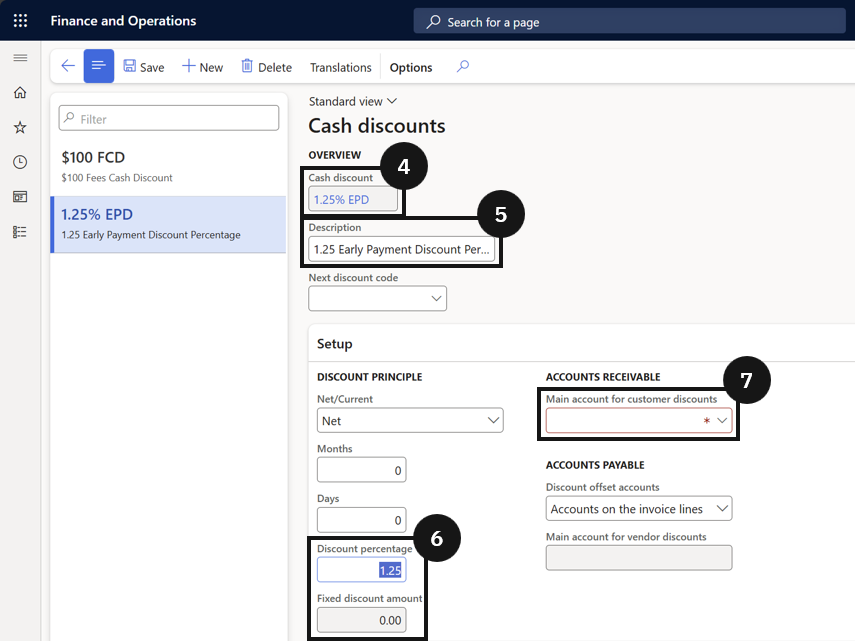
From the FNO dashboard, open Modules ▸ Accounts receivable, expand Payment setup, and click Cash discounts. Click New and complete the following:
- Cash discount code (④) — enter a unique code.
- Description (⑤) — enter a description.
- Discount percentage or Fixed discount amount (⑥) — specify one or the other.
- Main account for customer discount (⑦) — assign the account where the discount will be posted.
Save
Click Save.