Cancel or Amend a Payment Plan
Quick answer
- Open the fee payer, clear the Payment plan field in Payment defaults, save, then go to Academic ▸ View payment plan and click Merge invoice to consolidate split invoices back.
- Merge invoice is only available when split invoices already exist.
If a fee payer's payment plan needs to be removed, clear the plan from their payment defaults and merge the split invoices back into a single invoice to restore the original invoice structure.
Remove the payment plan
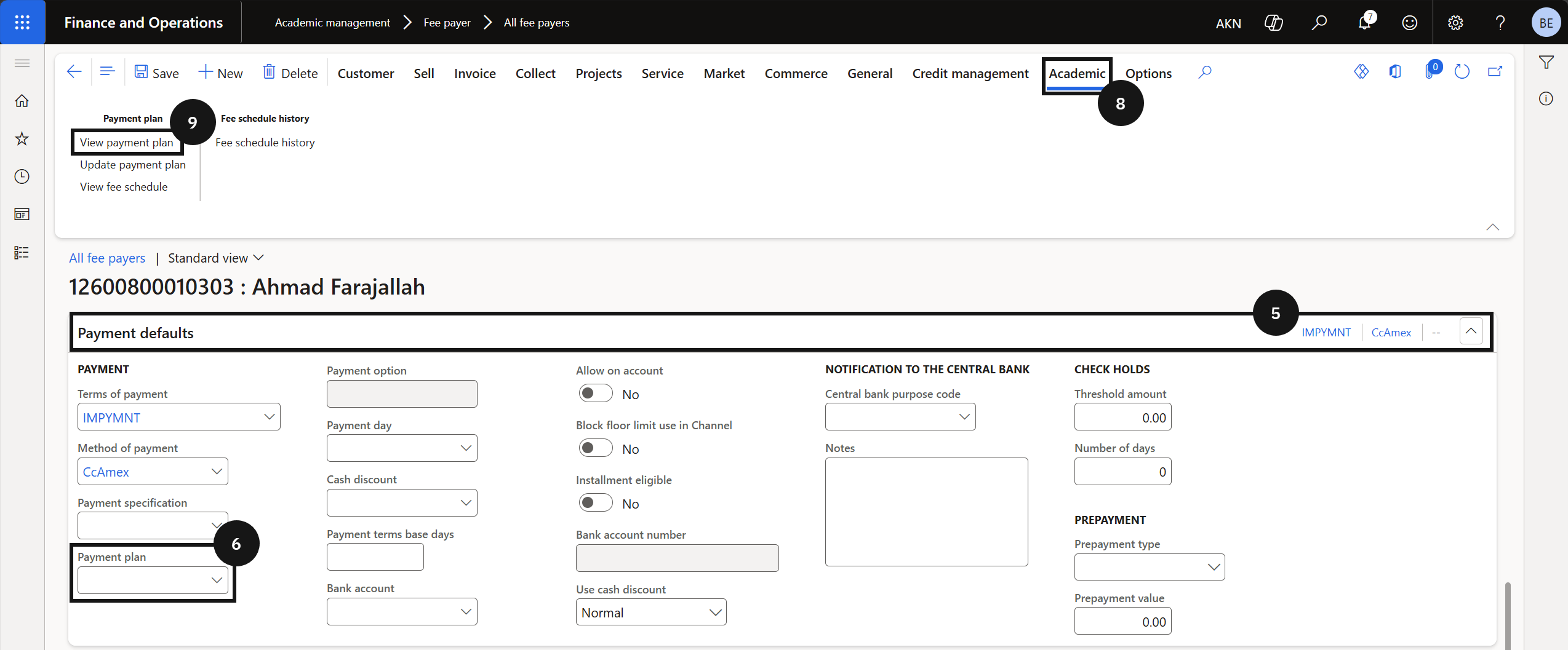
From the FNO dashboard, open Modules ▸ Academic management, expand Fee payer, and click All fee payers. Select and open the customer account (③). Click Edit in the toolbar. Expand Payment defaults (⑤) and clear the Payment plan field (⑥). Click Save.

Merge split invoices
Click the Academic tab (⑧) and click View payment plan (⑨). Tick the Mark checkbox to select one or more invoices. Click Merge invoice in the toolbar to consolidate the split invoices back into a single invoice. Merge invoice is only available when split invoices already exist. Click Yes to confirm, then click Save.