Bulk Update Early Payment Discounts on Invoices
Quick answer
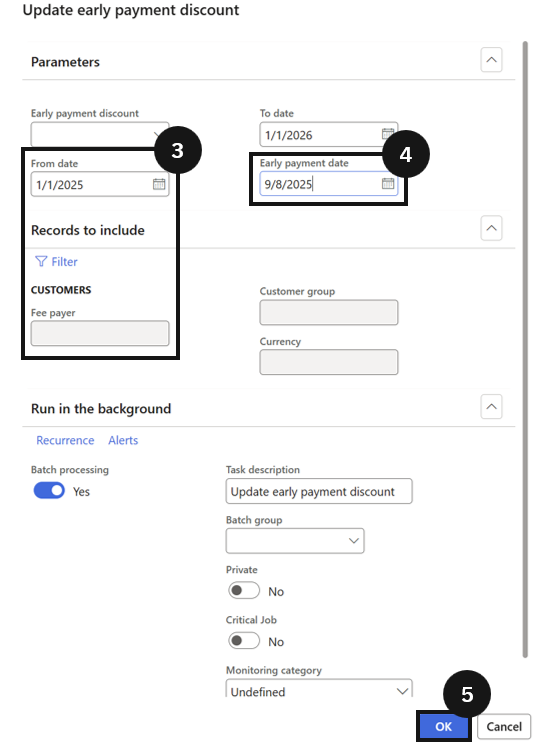
- Run Academic Management ▸ Periodic tasks ▸ Update early payment discount, set the date range and early payment date, and click OK.
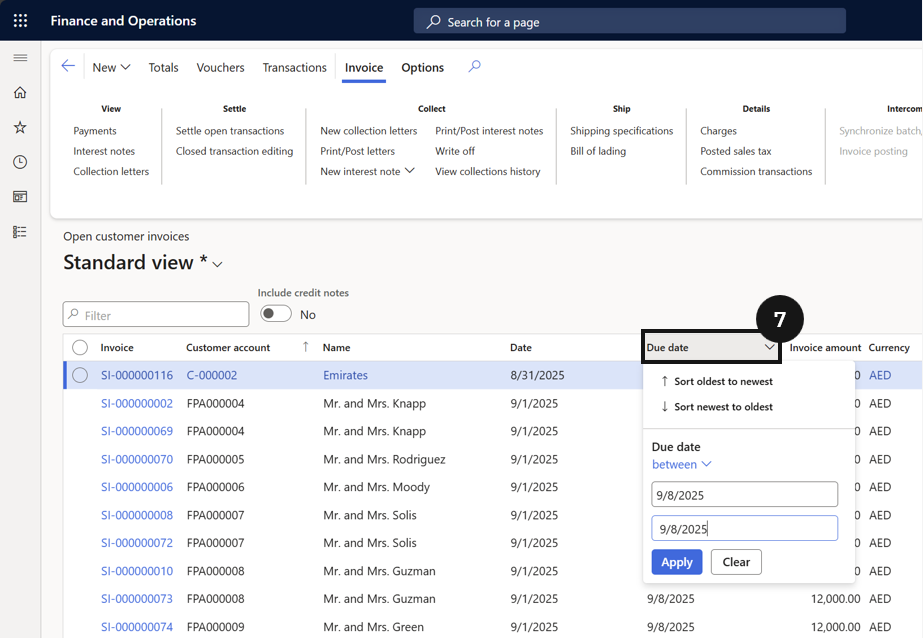
- Then verify in Accounts receivable ▸ Invoices ▸ Open Customer Invoices that discounts and due dates are updated.
After assigning discount codes to fee items, run this task to apply the early payment date and discount amounts across a batch of open invoices. Use it when the discount window needs to be set or updated for multiple invoices at once.
Run the update task
From the FNO dashboard, open Modules ▸ Academic Management, expand Periodic tasks, and click Update early payment discount. Enter the date range for invoices (③) to include (or filter for a single fee payer, or leave blank to run for all). Set the Early payment date for the selected invoices (④). Click OK to run the process (⑤).
Verify the updates
Navigate to Modules ▸ Accounts receivable ▸ Invoices ▸ Open Customer Invoices. Filter by fee payer and/or date range (⑦) to confirm discounts and due dates have been updated on the invoices.