Set Up Fee Structure — Trade Agreement
Quick answer
- Create a trade agreement journal using the academic journal name in Sales and marketing ▸ Prices and discounts ▸ Trade agreement journals, add a monthly price line and an annual price line for each academic attribute combination, then Post.
- Each academic attribute combination (academic year + curriculum + stream) requires two trade agreement lines: one monthly (fee invoices) and one annual (deposit calculations).
Fee structure setup defines the price applied to tuition fee items using trade agreements. Each tuition fee item requires two prices per academic attribute combination — a monthly price used when generating fee invoices, and an annual price used when calculating enrolment deposits.
Note: Each academic attribute combination (academic year + curriculum + stream) requires two trade agreement lines: one with a monthly unit and one with an annual unit. If any combination is missing a price, the system will not generate a price for that combination.
Review the fee item
From the FNO dashboard, open Modules ▸ Product information management, expand Products, and click Released products. Search for and open the tuition fee item to review before setting up the price.
Create the trade agreement journal and add price lines
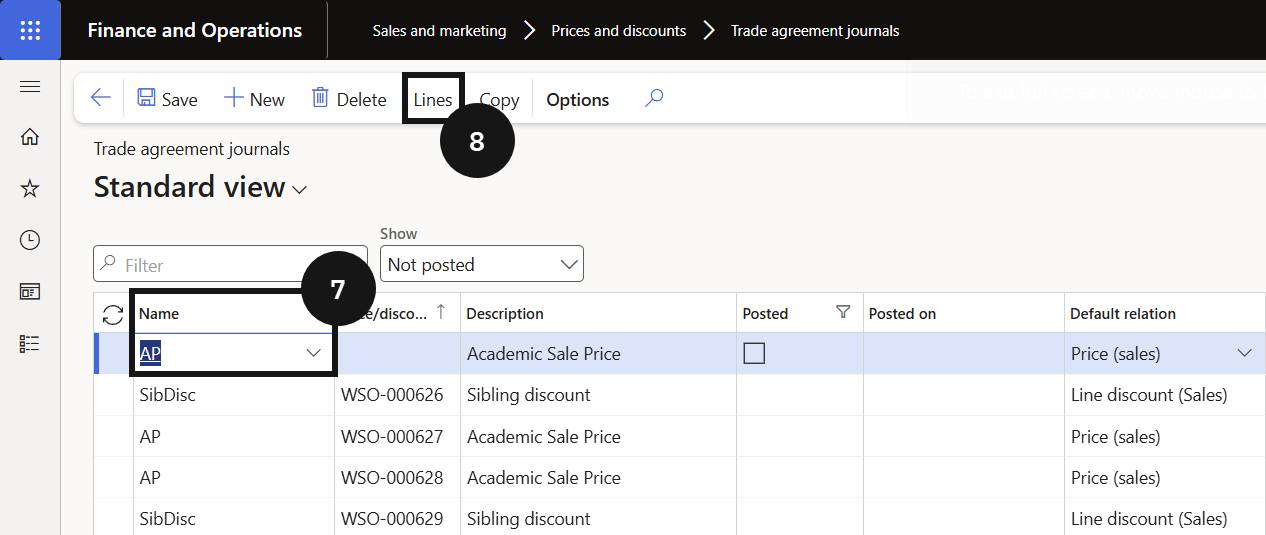
Navigate to Modules ▸ Sales and marketing, expand Prices and discounts, and click Trade agreement journals. Click New and in the Name field select the academic journal name (⑦). Selecting the academic journal name enables the Academic attributes flag, allowing prices to be set by academic year, curriculum, and stream.
Click Lines (⑧) and complete the columns to create the monthly price line. Copy the line for the same academic attribute combination (⑨), change the Unit to Annual (⑪), and enter the annual price. Repeat for each additional academic attribute combination.


Post
Click Post to activate the trade agreement.