Post Fee Invoices for a Whole Fee Schedule Batch
Quick answer
- Open the fee schedule batch from All fee schedule batches, click Post, choose a posting date, and optionally run as a background job.
- When complete, the batch status changes from Active to Invoice.
Once fee invoices have been generated and reviewed, post the batch to create the financial transactions in the system. The batch can be posted directly or as a background job for large volumes.
Open the batch and post
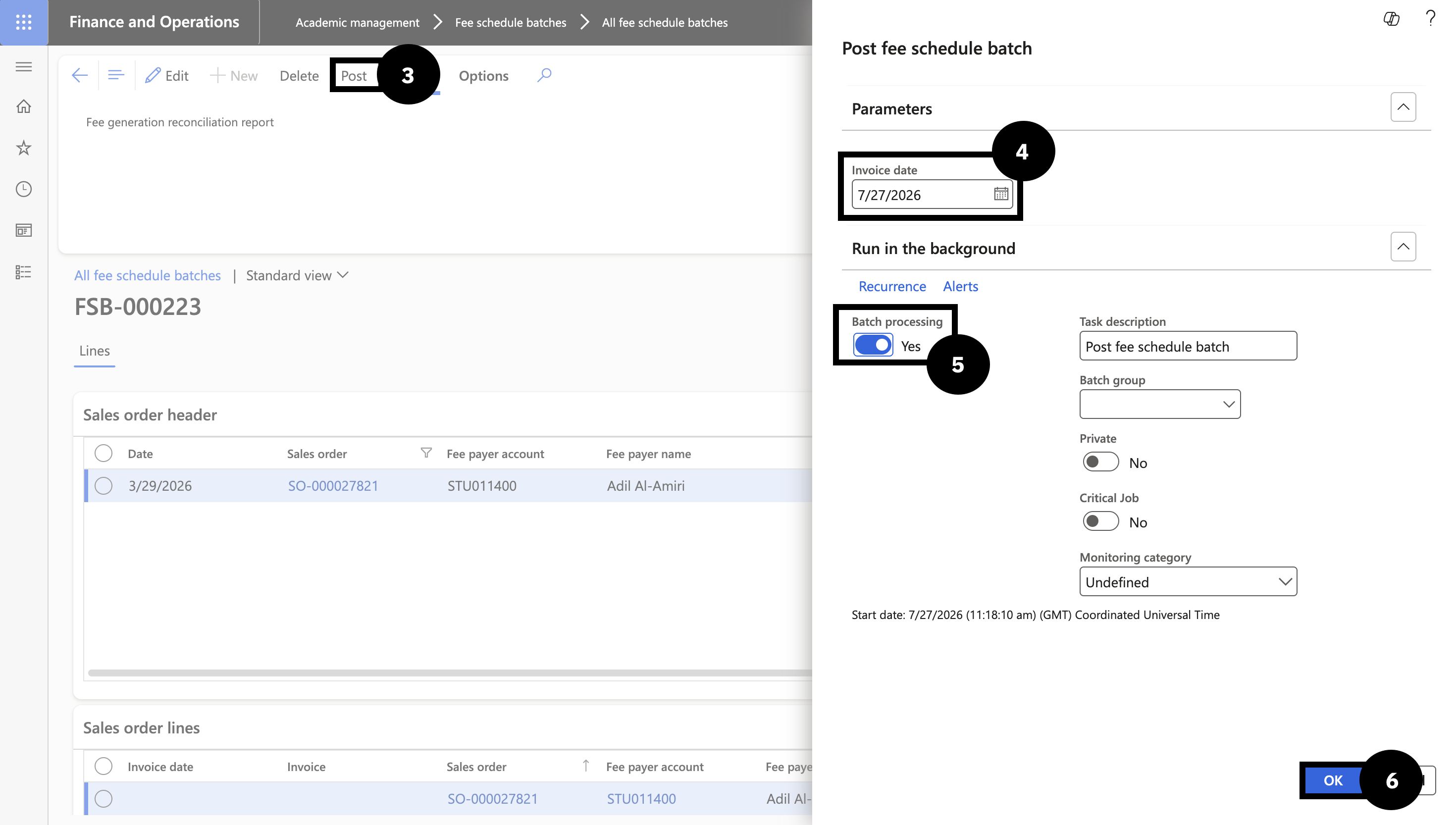
From the FNO dashboard, open Modules ▸ Academic Management, expand Fee schedule batches, and click All fee schedule batches. Click the Fee schedule batch number to open the batch (status must be Active). Click Post in the toolbar (③).
Set the posting date and submit
Choose the Posting date (e.g., end of June) (④). For large batches, expand Run in the background and enable Batch processing (⑤) before clicking OK (⑥) to avoid timeouts.
When complete, the batch status changes from Active to Invoice and all invoices are generated.