Generate Pro Rata Fee Adjustments for Late-Joining Students
Quick answer
- Run Academic Management ▸ Periodic tasks ▸ Generate sales order batch processing with the relevant fee schedule template, then review the batch to confirm late-starting students have a reduced tuition fee amount.
Run the batch processing task
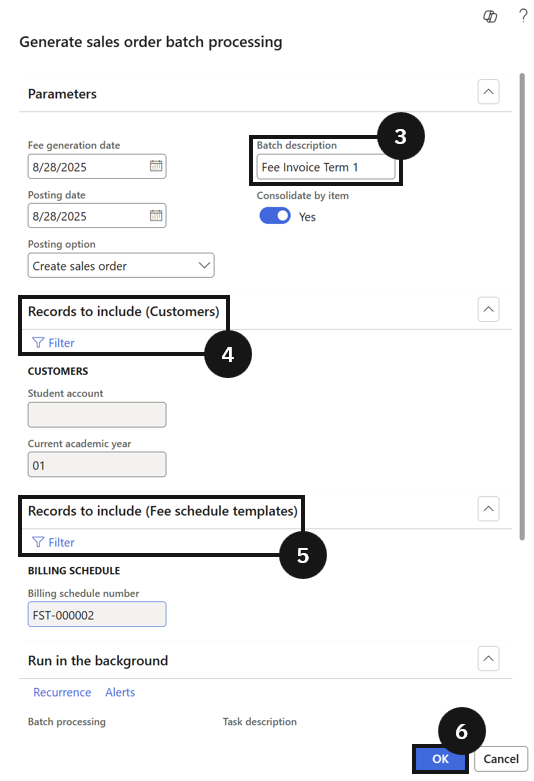
From the FNO dashboard, open Modules ▸ Academic Management, expand Periodic tasks, and click Generate sales order batch processing. In the dialog, enter a batch description (e.g., Fee invoice for Term 1 2025) (③). In Records to include (customers) (④), choose the appropriate customer academic year. In Records to include (fee schedule templates) (⑤), choose the appropriate billing schedule. Click OK to run the task (⑥).
Review the generated sales orders
Navigate to Modules ▸ Academic Management, expand Fee schedule batches, and click All fee schedule batches. Open the fee schedule batch and review the sales orders for each student. Confirm that students with late start dates have a reduced tuition fee amount, reflecting the pro rata calculation based on their actual study days.