Enable Pro Rata Adjustments — Leaving Students
Quick answer
- Open the tuition fee item in Product information management ▸ Products ▸ Released products, expand the Sell section, and set Pro rata to any option except None, then save.
- Ensure the Pro rata leaving option on the fee item matches the policy configured in Fee schedule parameters.
When a student leaves the school before the end of a term, any fees already invoiced for the remaining days need to be adjusted and refunded. Enabling pro rata on the fee item allows the system to calculate the correct refund when the Calculate fee and charge adjustment task is run. Ensure the Pro rata leaving option on the fee item matches the policy configured in Fee schedule parameters.
Open the tuition fee item
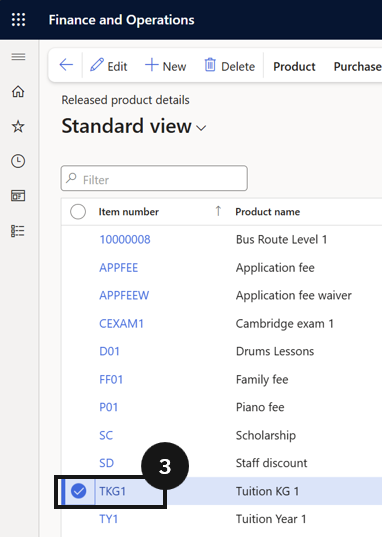
From the FNO dashboard, open Modules ▸ Product information management, expand Products, and click Released products. Locate and select the tuition fee item (e.g., FS1) (③).
Enable Pro rata
Open the Sell section and locate the Pro rata field. Set this field to any option except None to activate pro rata adjustment for leaving students.
Save
Click Save.