Create a Split Billing Fee Schedule Template
Quick answer
- Open Academic Management ▸ Fee schedules ▸ All fee schedules, click New, enter a name, billing interval, and fee schedule lines with conditions configured for split billing scenarios, then save.
For cases where the fee payers are not covering the financial responsibility equally, the school applies a different split to specific fee items. Setting up the fee schedule determines what bill is charged to each fee payer, and when.
Create a new template
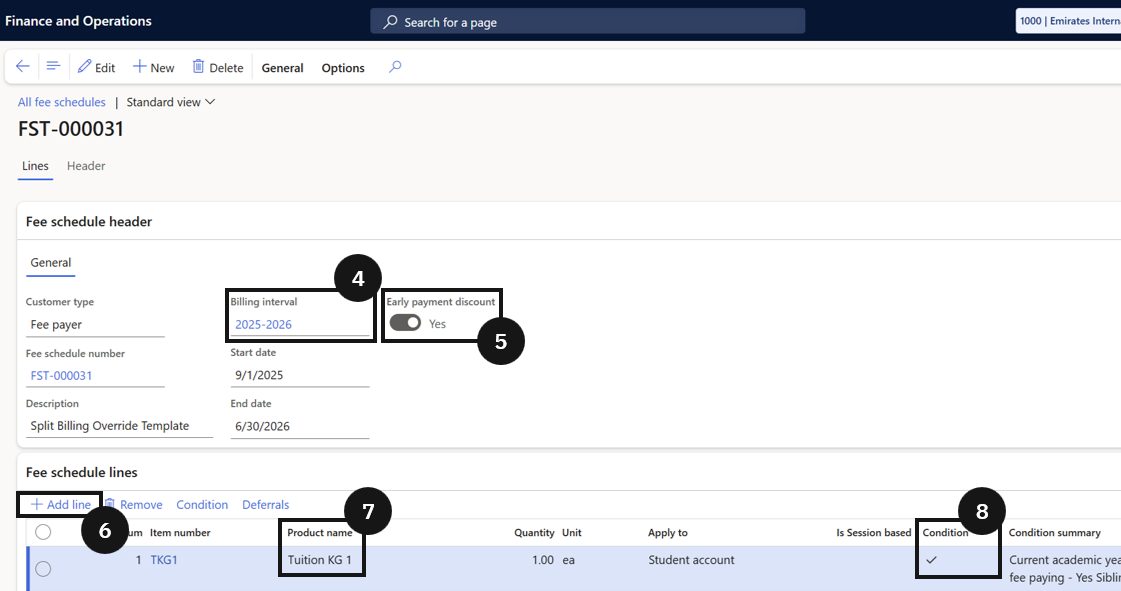
From the FNO dashboard, open Modules ▸ Academic Management, expand Fee schedules, and click All fee schedules. Click New and complete the header:
- Fee schedule name — enter a name (e.g., Split billing override template).
- Billing interval (④) — select the billing cycle (e.g., termly).
- Early payment discount (⑤) — enable if required.
Add fee lines and configure conditions
In the Fee schedule lines section, click Add line (⑥) and select the Product name (e.g., Tuition fee) (⑦). Enable Conditions (⑧) and click Condition in the toolbar. Set the Criteria for any required conditions (e.g., applies to current academic year students). Add any other required fee items (e.g., a Building Fund Fee item that applies to all students without conditions).
Save
Click Save.