Configure Split Billing Percent by Fee Item
Quick answer
- Open Academic Management ▸ Setup ▸ Split percent by fee items, click New, and configure custom split percentages per student per fee item with effective and expiration dates.
- This configuration applies only to sales orders generated after saving — existing invoices are not affected.
By default, the financial responsibility split between fee payers applies equally across all fee items. Where a school needs to apply a different split to a specific fee item, a per-student, per-item override can be configured here. This applies only to sales orders generated after the setup is saved — existing invoices are not affected.
Open Split percent by fee items and create a record
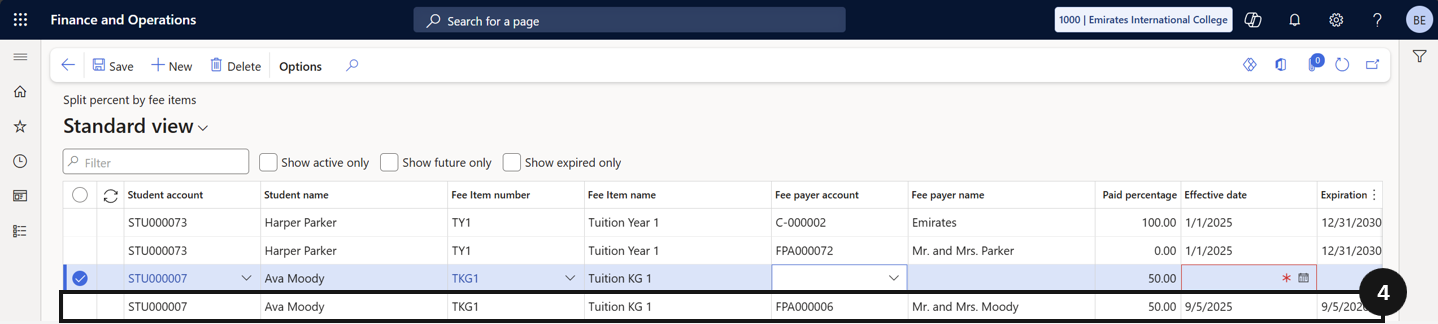
From the FNO dashboard, open Modules ▸ Academic Management, expand Setup, and click Split percent by fee items. Click New and complete the following columns for the first payer:
- Student — search and select the student.
- Fee item — select the specific fee item to override (e.g., Building Fund Fee).
- Percentage — enter the custom split percentage for this payer (e.g., 60% for Dad).
- Effective date and Expiration date — set the dates for this split configuration.
Add the second payer
Repeat step 1 for the other payer with the remaining percentage (e.g., 40% for Mum) (④). Ensure the percentages total 100%.
Save
Click Save.