Complete an onboarding task
Quick answer
- From the ESS portal, navigate to Tasks.
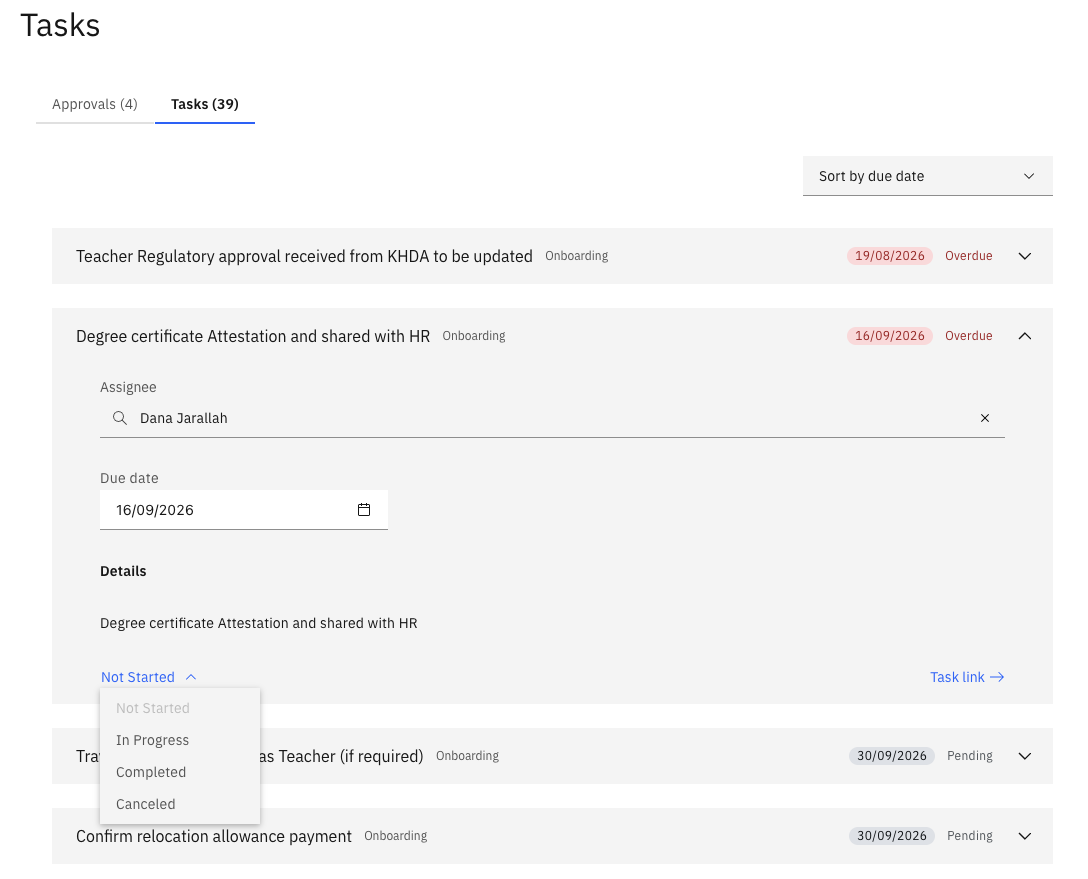
- Locate your onboarding task, open it, and update the status in the dropdown to reflect completion.
- Click Confirm to record the update.
When you join GEMS, we automatically assign you an onboarding checklist. Complete each task in the list as you progress through the onboarding process.
Open your task list
From the ESS portal, navigate to Tasks. Your onboarding tasks are listed here with their current status (Open, In Progress, or Completed).
Open a task
Click on a task to view its details, including the task description and any dependencies that must be completed before you can progress.
Update the status
Once the task is ready to be completed, update the status in the dropdown to reflect that it is done.
Confirm
Click Confirm to record the update. The task is marked complete and removed from your active list.