Find your way around ESS
Quick answer
- Your ESS home page shows tiles for each area — click any tile to go there.
- Use the notification bell at the top right for alerts about expiring documents and new tasks.
- Navigate back to the home page at any time using your browser or the Home icon.
ESS is built around a home page of tiles. Click any tile to go directly to that area — no menus to dig through.
Use the tiles on your home page
When you log in, you see tiles for each area available to you:
Tile What you'll find there My Profile Your personal details, identification, contacts, payment information, skills, and certifications Tasks/Onboarding Checklists of tasks assigned to you Submit request Submit request items to HR Courses and GEMSU courses Lists of courses overdue, due soon or assigned courses Company Directory Search for colleagues by name or reporting manager Org chart Visual view of your team structure and reporting lines 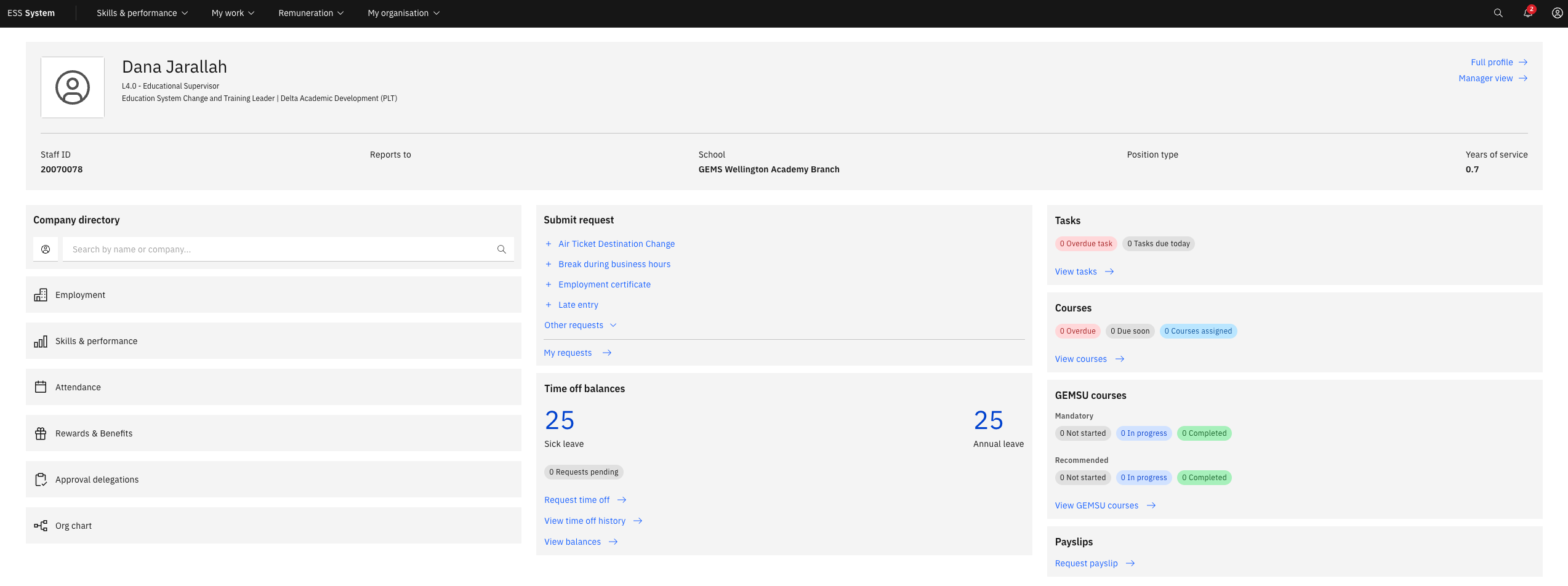
Check the notification bell
The bell icon in the top-right corner alerts you when action is needed — for example, when a document is approaching expiry, a new questionnaire is assigned, or a new approval request is submitted. Click a notification to jump directly to the relevant record.
Navigate back to home
To return to the home page at any time, click ESS System in the navigation bar or use your browser's back button. ESS runs in any web browser — there is nothing to install.