View your GEMSU courses
Quick answer
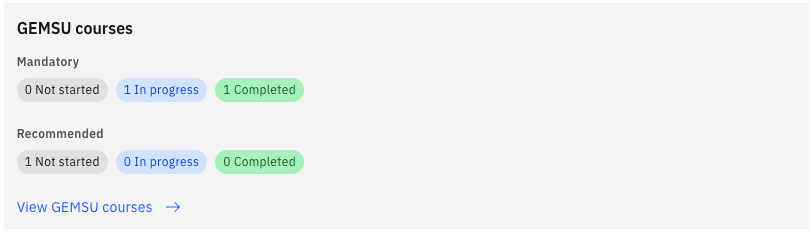
- From the ESS home page, click the GEMSU courses tile to open your GEMSU courses.
- Review your In progress, Not started and Completed courses, each tagged Mandatory or Recommended.
- Check the Overdue flag for any course whose start date has passed.
Your GEMSU learning is surfaced directly in ESS, so you don't need to go into GEMSU to see where you stand. Courses flow into ESS automatically through the integration between GEMSU and ESS — this is a read-only view, and you still complete the courses themselves in GEMSU.
Open your courses
From the ESS home page, click the GEMSU courses tile. This opens your GEMSU course list.
Review your courses in progress
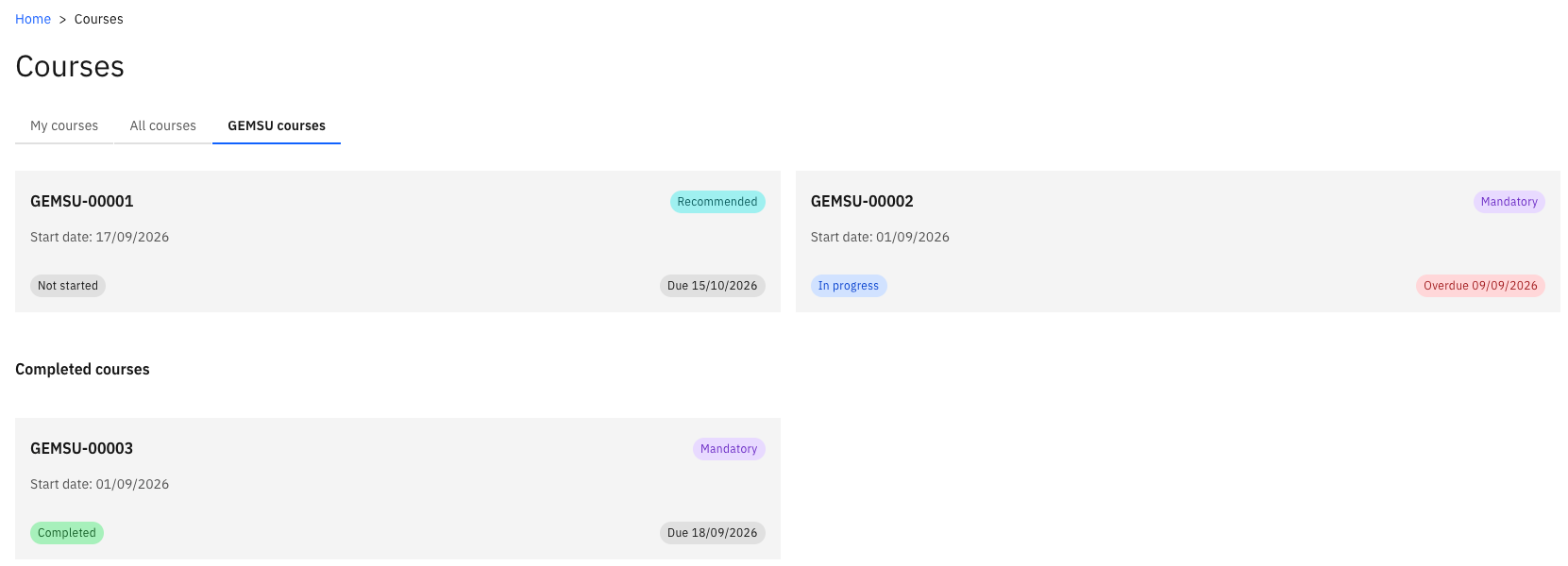
The list shows every course currently assigned to you. Each course carries a tag showing whether it is Mandatory or Recommended, so you can see at a glance what you're required to complete.
Courses you have opened show as In progress. Courses assigned to you but not yet opened show as Not started.
Check for overdue courses
Any course whose start date has passed is flagged as Overdue. Use this flag to prioritise — an overdue mandatory course is the one to pick up first.
Review your completed courses
Completed courses stay on the list with a Completed status, and keep their Mandatory or Recommended tag. This gives you a running record of the learning you have finished.
If a course you have completed in GEMSU still shows as in progress in ESS, allow time for the integration to run before raising it with your HR team.